Ad Clicks : Ad Views : Ad Clicks : Ad Views : Ad Clicks : Ad Views : Ad Clicks : Ad Views :
Oh Snap!

It looks like you're using an adblocker. Adblockers make us sad. We use ads to keep our content happy and free. If you like what we are doing please consider supporting us by whitelisting our website. You can report badly-behaved ads by clicking/tapping the nearby 'Advertisement' X text.

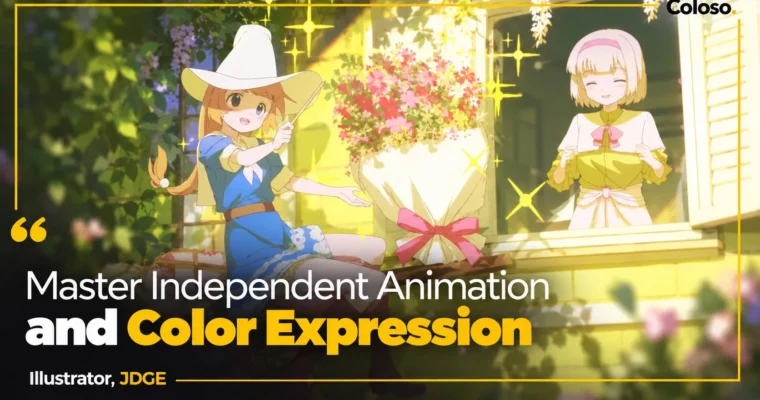
Master Independent Animation and Color Expression by JDGE

Master Independent Animation and Color Expression by JDGE

Author:JDGE

Duration:56Hours 7Minutes

Actual Duration:112h 10m

Release date:2025, September 9

Publisher:Coloso

Skill level:Advanced

Language:English

Exercise files:Yes

Software:CLIP STUDIO PAINT EX

Course URL:https://coloso.global/en/products/2danimator-jdge-us

Learn to make your own short animations from scratch with expressive movement and warm, punchy color.

Want to stop just drawing stills and actually make them move? This class walks you through the full indie loop with JDGE β€” from bouncing ball timing to blinks, walks, runs, backgrounds that sit right, and color that tells the viewer where to look.

🎯 What you’ll learn

  • Animate shapes, easing, and timing that transfer to any character or effect
  • Draw consistent characters and animate blinking, lip-sync, hair, and clothes
  • Build walks, runs, jumps, turns, and sitting / lifting / throwing actions
  • Match characters to backgrounds using base figures, eye level, and perspective
  • Direct the eye with color planes, composition, and lighting
  • Color with theory, not vibes β€” RGB relativity, tone curves, grisaille, and layer modes
  • Add camera work in CLIP STUDIO PAINT β€” pan, follow, shake, and flicker

βœ… Requirements

  • Skills: Basic drawing ability, no prior animation experience needed
  • Tools: CLIP STUDIO PAINT EX, drawing tablet recommended
  • Hardware: PC or tablet capable of running CLIP STUDIO PAINT smoothly

πŸ“ Description

This is not theory-only animation talk. You start in CLIP STUDIO PAINT EX setting up cells, timelines, onion skin, and FPS, then you animate a ball until easing and spacing actually click. That boring ball? It fixes 90% of floaty beginner motion.

From there you get into characters for real. Base figures, head counts, center of gravity, faces, wrinkles β€” then you put them in motion: blinks, mouths, head sway, hair dynamics, walks and runs. JDGE keeps it practical with cell separation tips so parts stop breaking when they move.

The middle chunk is what most solo animators mess up: perspective. You learn to pull eye level and vanishing points straight from the body, size props correctly, and draw backgrounds in normal, bird’s-eye, and worm’s-eye views. No more floating characters.

Then color. This is JDGE’s strong suit. You work with color planes, gaze direction, and light-as-exaggeration instead of just shading harder. He breaks down why pure white/black kills your image, how gray vs. saturated color tricks the eye, plus tone curves, grisaille, layer modes, flare, and aerial perspective β€” with numbers, not just feel.

You finish by making a full short: concept, layout, color rough, motion rough, keys, in-betweens, clean-up, background finish, camera, and export. You get traceable Clip Studio files, PSDs, and perspective drills to study frame by frame.

πŸ§‘β€πŸŽ“ Who this course is for

  • Beginners in animation who want to finish their own self-produced short
  • Artists who struggle to lock characters and backgrounds into the same perspective
  • Illustrators who want more appealing coloring, lighting, and composition

πŸ§‘β€πŸ« About the Author

JDGE is a freelance illustrator and animator from Japan, known for warm short animations and bold, graphic color choices. Before going freelance, he spent several years as a game illustrator.

His credits include character design for Kodansha’s Kumei no Ryuki, in-game art for Utawarerumono: Lost Flag, key animation for ONE PIECE #1091 and Proseka MV NEO, plus work on Genshin Impact and VTuber MVs. He also took the Grand Prize at the EIZO Illustration Contest. He teaches indie-first: flexible base figures, strong acting ideas, and color you can control.

🏁 Final Result

  • A finished original short animation β€” from layout and color rough to keys, in-betweens, background, camera work, and export β€” plus polished stills and color roughs ready for your portfolio.
Curriculum

πŸ“‹ Course content

  1. Section 01:  Introduction
      1. Introduction and Course Overview
  2. Section 02:  Setting Up CLIP STUDIO PAINT EX
      1. Setting Up CLIP STUDIO PAINT EX – Part 1
      1. Setting Up CLIP STUDIO PAINT EX – Part 2
  3. Section 03:  Ball Animation
      1. Animation Functions Explained Using a Ball
      1. Smooth Movement and Timing Using a Ball
      1. Key Frames and In-between Concepts
      1. Trying Out Various Movements
  4. Section 04:  Character Warm-up Exercises
      1. How to Draw Basic Body Forms
      1. Facial Proportions
      1. Drawing Clothes
  5. Section 05:  Character Animation Examples
      1. How to Animate Blinking and Mouth Movements
      1. Understanding Motion Paths
      1. Character Animation Example 01 – Swaying head and body movements
      1. Character Animation Example 02 – Hair movement
      1. Character Animation Example 03 – Walking and running
  6. Section 06:  The Charm of Short Animations
      1. Definition of Short Animations
      1. Creating Surprising and Engaging Short Animations
      1. What to Do When You Are Stuck
  7. Section 07:  Characters, Perspective, and Backgrounds
      1. How to Draw Character Body Forms
      1. Drawing Bust-Up and Full-Body Poses
      1. Calculating Perspective from Body Forms
      1. Understanding Background and Object Dimensions
      1. Drawing Backgrounds Based on Body Forms
      1. Drawing Backgrounds Based on Body Forms (Birds Eye and Worms Eye Views)
      1. Advanced Background Thinking
  8. Section 08:  Color Expression and Composition
      1. Guiding the Viewers Eye and Color Planes – Part 1
      1. Guiding the Viewers Eye and Color Planes – Part 2
      1. Color Expression and Color Range – Part 1
      1. Color Expression and Color Range – Part 2
      1. Color Expression and Color Range – Part 3
  9. Section 09:  Actual Coloring Techniques
      1. JDGEs Coloring Techniques – Part 1
      1. JDGEs Coloring Techniques – Part 2
      1. Adjusting and Controlling Color Information
  10. Section 10:  Camera Work
      1. Camera Work in CLIP STUDIO PAINT – Part 1
      1. Camera Work in CLIP STUDIO PAINT – Part 2
      1. Camera Work in CLIP STUDIO PAINT – Part 3
  11. Section 11:  Project Work
      1. Deciding on Concept and Layout
      1. Color Roughs / Background Roughs
      1. Motion Roughs
      1. Key Animation (Clean-Up)
      1. In-between Animation
      1. Coloring
      1. Background Finishing
      1. Shooting Process – Part 1
      1. Shooting Process – Part 2
      1. Completion and Export
  12. Section 12:  Advanced Animation Techniques
      1. Bust-Up Character Movements: Waving hand motion
      1. Bust-Up Character Movements: Up and down movement of head and shoulders
      1. Bust-Up Character Movements: Turning around
      1. Bust-Up Character Movements: Hair fluttering and S-curve trajectory
      1. Bust-Up Character Movements: Fluttering front-to-back movements
      1. Bust-Up Character Movements: Fluttering of clothes
      1. Bust-Up Character Movements: Clothing Movement
      1. Full-Body Character Movements: Walking and Running
      1. Full-Body Character Movements: Jumping
      1. Full-Body Character Movements: Advanced Techniques 01
      1. Full-Body Character Movements: Advanced Techniques 02
  13. Section 13:  Submitting Your Work and Course Wrap-up
      1. Tips for Submitting Your Work and Staying Productive
      1. Mindset for Creating Your Own Work

πŸ“’ Guys, this is a Group Buy campaign, check the GBC forum thread to get access

You can find the course preview in the download section below.

Watch online or Download for Free
Master Independent Animation and Color Expression by JDGE
NAME
SIZEDURATION
JDGE Eng Dub
56.6 MB43m
Section 01 – Introduction
3 MB3m
Section 03 – Ball Animation
0 B
Section 04 – Character Warm-up Exercises
9 MB5m
Section 05 – Character Animation Examples
5.3 MB5m
Section 06 – The Charm of Short Animations
4.3 MB5m
Section 07 – Characters, Perspective, and Backgrounds
8.1 MB5m
Section 08 – Color Expression and Composition
0 B
Section 09 – Actual Coloring Techniques
0 B
Section 10 – Camera Work
7.9 MB5m
Section 11 – Project Work
8.5 MB5m
Section 12 – Advanced Animation Techniques
0 B
Section 13 – Submitting Your Work and Course Wrap-up
0 B
JDGE Eng Sub
19.6 MB18m
Section 01 – Introduction
3 MB3m
Section 02 – Setting Up CLIP STUDIO PAINT EX
6.3 MB5m
Section 03 – Ball Animation
0 B
Section 04 – Character Warm-up Exercises
0 B
Section 05 – Character Animation Examples
0 B
Section 06 – The Charm of Short Animations
0 B
Section 07 – Characters, Perspective, and Backgrounds
0 B
Section 08 – Color Expression and Composition
0 B
Section 09 – Actual Coloring Techniques
0 B
Section 10 – Camera Work
0 B
Section 11 – Project Work
0 B
Section 12 – Advanced Animation Techniques
5.6 MB5m
Section 13 – Submitting Your Work and Course Wrap-up
4.7 MB5m

Download all

Join us on
  Channel    and      Group

Leave a Comment

Your email address will not be published. Required fields are marked *