

MED Archer — New Blender Concept Design Tutorial – Out Now by Andrei Kurylovich

Duration:6 hours of lessons
Actual Duration:5h 40m
Release date:2026, November 23
Publisher:Aurora Machina
Skill level:Beginner
Language:English
Exercise files:Yes
Software:Blender, Photoshop
Course URL:https://aurora-machina.com/p/med-archer
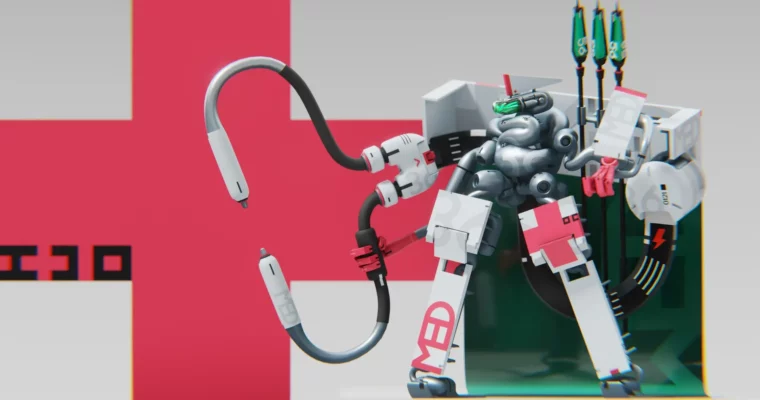
This is a full run-through of how a working concept designer actually builds a robot: you start with messy Photoshop sketches to find the idea, then block it out and finish it in Blender with real materials, decals, and studio lighting.
🎯 What you’ll learn
- How to generate and combine ideas for believable robot concepts
- Sketching and thumbnailing workflow in Photoshop for 3D
- Blender basics for concept design and hard-surface blockout
- Designing mechanical joints with animation in mind
- Detailing with decals, materials and lighting
- Rendering clean studio shots and a turntable for portfolio
✅ Requirements
- Skills: Basic viewport navigation in Blender, no modeling or design background needed
- Tools: Blender (free), Photoshop or Krita / Procreate, HardOps and PieMenuEditor highly recommended
- Hardware: 3-button mouse, PC capable of running Blender with dedicated GPU recommended
📝 Description
Most beginners get stuck either in 2D or in 3D. This course ties them together. You start in 2D where it’s cheap to fail — quick thumbnails, kitbashing shapes, testing silhouettes. Then once you have something worth building, you take it into Blender and commit.
The Blender part is built for designers, not technicians. No endless modifier stacks just for fun. Andrei shows the core hard-surface modeling moves he actually uses: blockout, boolean cleanup, bevel control, joint placement. Plus how he sets up HardOps and PieMenuEditor so you’re not fighting hotkeys every five seconds.
Then comes the part that sells the design. You’ll add panel breaks, decals, simple PBR materials, and set up straightforward studio lighting for readable renders. Joints are built with movement in mind, so the bot looks like it could actually walk and aim, not just stand there. By the end you have proper studio shots and a turntable — the kind of output art directors want to see.
It’s 6 hours, subtitled, with 2D/3D assets and demo .blend files included. Watch it straight through, then redo the MED Archer on your own without pausing. That’s where it clicks.
🧑🎓 Who this course is for
- Beginners who can move around Blender but have never finished a full concept
- 2D artists and illustrators who want a practical 3D workflow for mechs and robots
🧑🏫 About the Author
Andrei Kurylovich (AURORA MACHINA) is a concept designer working in entertainment with a decade of experience on AAA games. He’s designed environments, props, machines and characters, and runs personal worldbuilding projects online.
He teaches like he works — fast, direct, focused on readable shapes and functional design rather than theory. If you follow his stuff, you know his mechs actually look engineered.
🏁 Final Result
- Finished MED Archer robot concept: from Photoshop thumbnails to detailed Blender model with materials, decals, studio lighting, rendered stills and turntable
 Channel