MAYA 3D – Modeling for Beginners – Create now by Antoine LEFEBVRE

Actual Duration:9h 36m
Release date:2024, October
Publisher:Udemy
Skill level:Beginner
Language:English
Exercise files:Yes
Course URL:https://www.udemy.com/course/maya-3d-modeling-for-beginners/
title: MAYA 3D – Modeling for Beginners – Create now
URL: https://www.udemy.com/course/maya-3d-modeling-for-beginners/
gbc_url: null
video_preview: null
publisher: Udemy
teaser: Learn Maya from zero by actually modeling – from interface basics to a finished WALL-E character.
author: Antoine LEFEBVRE
marketing_video_duration: 9.5 hours
updated_at: 2024-01-01
language: EN
level: Beginner
software:
– Autodesk Maya
categories:
– Udemy
tags:
– ‘#Maya’
– ‘#3DModeling’
– ‘#Beginner’
– ‘#HardSurface’
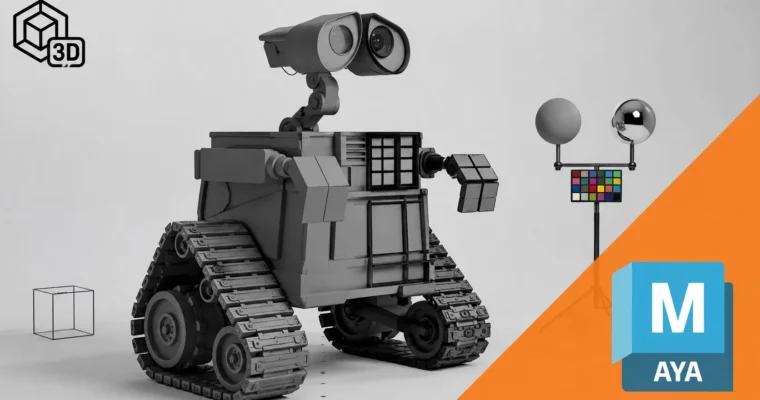
Stylized WALL-E robot 3D model built in Autodesk Maya viewport’
title: ‘Model WALL-E in Maya from Scratch’
caption: ‘Meet WALL-E – the full character you will block out, detail, and finish by the end of the course.’
description: ‘A friendly Pixar-style WALL-E robot centered in a dark Maya viewport with clean studio lighting. Boxy yellow body, binocular eyes and tracked wheels show off clean hard-surface topology. Perfect visual for a beginner modeling project from blocking to final render.’
Want to finally get Maya without getting lost in menus? This course walks you through Autodesk Maya, polygon modeling, and a real workflow, and you finish with a complete WALL-E you built yourself.
🎯 What you’ll learn
- Navigate Maya interface and viewport with confidence
- Build a solid grounding in polygon modeling
- Use a clean, professional working method
- Work with Extrude, Bevel, MultiCut, Bridge and more
- Model small props and full projects from A to Z
- Fix topology, face orientation and common beginner mistakes
- Apply tips and tricks for faster, easier modeling
✅ Requirements
- Skills: No prior 3D experience required, complete beginner friendly
- Tools: Autodesk Maya installed, any recent version works
- Hardware: Computer capable of running Maya, 3-button mouse recommended
📝 Description
This is not theory-only Maya. You learn a tool, then you use it right away on a small mesh. That loop is what makes it stick.
We start simple: viewport navigation, Outliner, Channel Box, shelves, moving stuff around without breaking your scene. Then we get into the stuff you will actually use every day – components, topology, Extrude, Bevel, MultiCut, Bridge, Smooth, face orientation. No fluff, just what each tool does and when to reach for it.
Midway you get a spoon exercise to practice clean shapes, plus tools like Target Weld, Match Transforms, Sweep Mesh, Quad Draw, Circularize and Booleans. These are the little workhorses that fix messy geometry and save you hours when a model gets complicated.
Then the fun part: a full WALL-E build from scratch. Blocking, eyes, neck, body, arms, wheels, then a simple final render. You see a real hard-surface workflow – how to plan proportions, add details in passes, and keep your model clean and organized like in a studio.
🧑🎓 Who this course is for
- Total beginners who have never opened Maya
- Hobbyists who want to learn 3D modeling properly on Maya
- Students who want to lock in solid basics before 3D school
- Curious creatives who want a professional working method from day one
🧑🏫 About the Author
Antoine LEFEBVRE is a 3D instructor focused on getting beginners up and running in Autodesk Maya. His teaching style is practical and straight to the point – short explanations, then live demos on real models. He specializes in breaking down modeling fundamentals so new artists can build clean work and tackle their own projects with confidence.
🏁 Final Result
- A fully modeled WALL-E character – blocked, detailed, and rendered – ready to show as your first portfolio piece
 Channel