Let’s Make Cool and Cute Abstract CG Using the Free Software Blender by sikinnsn

Duration:3 hours 54 minutes
Actual Duration:3h 54m
Release date:2022, February 15
Publisher:Class101
Skill level:Intermediate
Language:English
Exercise files:Yes
Software:Blender
Course URL:https://class101.net/en/products/6169116aee320c001442688a
Want to go from flat 2D ideas to real 3D visuals without paying for software? This class walks you through Blender basics to finished abstract CG images and short animations, all in a cool and cute style.
🎯 What you’ll learn
- Navigate Blender and use essential modeling tools for abstract shapes
- Model simple objects like cups as a base for stylized scenes
- Build procedural materials including glass, liquid and glowing shaders
- Set up lighting that makes transparency and colors pop
- Compose and render clean abstract still images
- Create simple CG animation and short loops for social and portfolio
✅ Requirements
- Skills: Basic computer skills, no prior 3D experience needed, beginner-friendly and also useful for intermediate users
- Tools: Blender (free), any image/video player for review
- Hardware: PC or Mac capable of running Blender, 3-button mouse recommended
📝 Description
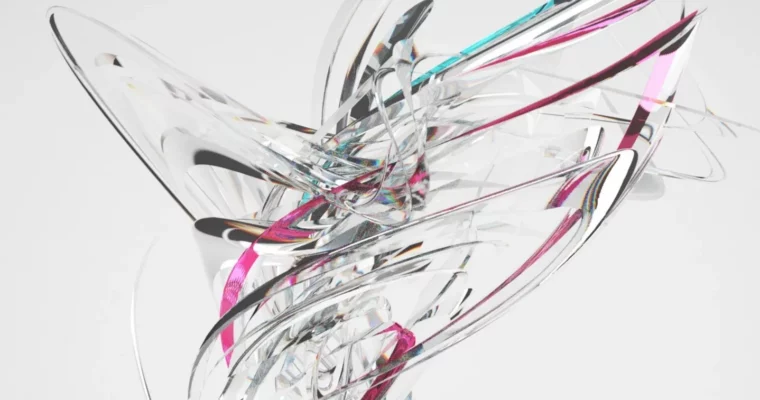
You don’t need to build photoreal stuff to make good 3D. This class is all about shapes that don’t exist in real life — clean, transparent, a little cute. You’ll start with Blender basics and modeling, so even if you’ve never touched 3D, you can follow along and get something on screen fast.
Then we get into the part that really sells the look. You’ll play with procedural materials, glass shaders and liquid looks, plus how transparency, roughness and refraction actually behave. No random slider tweaking — you’ll learn what each setting does so you can reuse it.
Light makes or breaks this style. You’ll cover practical lighting, shadows, reflections and emission materials to get that soft glow. Finally, you’ll take a still scene and turn it into movement with simple keyframe animation, camera moves and loopable renders. Each project takes about 30 minutes to 2 hours, so you finish with images and a short video you can actually post.
🧑🎓 Who this course is for
- Beginners in 3D who want to make stylish abstract images without getting lost in complex character or hard-surface modeling
- 2D artists, designers and hobbyists who want to add Blender renders and short animations to their work
🧑🏫 About the Author
sikinnsn, also active as shikisai, is a CG creator focused on abstract CG as art, mainly sharing work on Twitter and Instagram. Their style leans clean and transparent, often used for CD jacket design and MV production. They started 3D to give shape to things they imagined, and built this class because that kind of abstract workflow was hard to learn alone.
🏁 Final Result
- A set of finished abstract CG stills with glass, liquid and glowing materials, plus a short CG animation loop — ready to post and add to your portfolio.
 Channel