


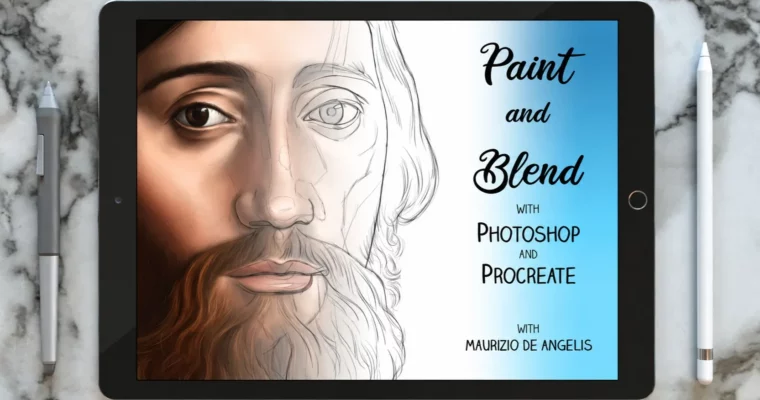
Projects Digital Painting (Part 1 and 2) by Maurizio De Angelis

Duration:1h 23m + 4h 13m
Actual Duration:5h 36m
Release date:2025
Publisher:Skillshare
Skill level:Beginner
Language:English
Exercise files:Yes
Software:Photoshop, Procreate
Course URL:https://www.skillshare.com/en/classes/digital-painting-paint-like-an-old-master-with-photoshop-and-procreate-part-1/1412126976
You’ll recreate a Hans Holbein the Younger portrait from scratch in Photoshop and Procreate, from old-paper background to final texture. Part 1 covers setup, drawing, and paths, Part 2 is all portrait painting and blending — you finish with a proper Old Master-style piece for your portfolio.
🎯 What you’ll learn
- Set up the canvas and build an aged old-paper background
- Study Hans Holbein the Younger and plan the recreation
- Use 3 classic drawing methods including grid transfer
- Work with the Path Tool in Photoshop and the Procreate alternative
- Build a custom palette and work with 20+ downloadable skin tones
- Paint face, beard, hair, hat, and clothes with correct volume and shading
- Blend smoothly with tuned brush settings
- Finish with color adjustments, noise, and canvas texture
✅ Requirements
- Skills: Basic drawing confidence helps, no oil painting background needed
- Tools: Adobe Photoshop, Procreate, drawing tablet or iPad with stylus
- Hardware: Computer capable of running Photoshop or iPad running Procreate
📝 Description
This is a two-part, paint-along rebuild of an old masterpiece. No theory dump. You watch the process, then do it yourself — background, drawing, flat color, shading, blend, detail.
Part 1 is all prep. You’ll set up your canvas, make a convincing old-paper background, and get the drawing right with three classic methods. If you just want to paint, you can download the drawing, grid, paper, and Photoshop paths and jump in. Maurizio also breaks down the Path Tool in a way that actually makes sense, plus what to do instead in Procreate.
Part 2 is where it gets fun. You’ll paint face and beard in two passes, then blend it smooth without turning it to mush. Same approach for hair, hat, and clothes — lay in volumes, push the shadows, keep the edges under control. Then you tie it together: background, color adjustments, jewels and small highlights, plus noise and canvas texture for that aged, painted-on-panel feel.
You also get usable extras: reference image, grid assignment, custom palette, 20+ skin types, and texture files. Handy stuff you can reuse on your next portraits.
🧑🎓 Who this course is for
- Illustrators and beginners who want a clear, step-by-step way into realistic digital portraiture
- Photoshop or Procreate users who struggle with muddy blending, flat skin, and digital-looking finishes
🧑🏫 About the Author
Maurizio De Angelis is a scientific illustrator and 3D modeller based in London since 2004, making digital content for film, TV commercials, books, and journals. He trained in traditional painting at the Accademia delle Belle Arti in Rome and Florence, surrounded by the real thing.
Alongside client work he still paints private portrait commissions in oil paint on wooden panels, which is why his digital blending method feels so traditional. His work was recognized with a Wellcome Image Award in 2015.
🏁 Final Result
- A finished Old Master-style digital portrait of Holbein’s subject, with painted face, beard, hair, hat, clothes, jewels, and aged background — ready to post as a portfolio piece.
 Channel



Hello can u please upload new gnomon workshop course The Principles of Physics in Action Scenes?