Ad Clicks : Ad Views : Ad Clicks : Ad Views : Ad Clicks : Ad Views : Ad Clicks : Ad Views :
Oh Snap!

It looks like you're using an adblocker. Adblockers make us sad. We use ads to keep our content happy and free. If you like what we are doing please consider supporting us by whitelisting our website. You can report badly-behaved ads by clicking/tapping the nearby 'Advertisement' X text.

VFX & Animation Masterclass – Compositing, Tracking & Effects by MKCL India

VFX & Animation Masterclass – Compositing, Tracking & Effects by MKCL India

/

Author:MKCL India

Duration:14 hours on-demand video

Actual Duration:13h 54m

Release date:2026, September

Publisher:Udemy

Skill level:Beginner

Language:English

Exercise files:Yes

Software:Adobe After Effects, Boris FX Silhouette, Nuke, Mocha Pro

Course URL:https://www.udemy.com/course/vfx-animation-masterclass-compositing-tracking-effects/

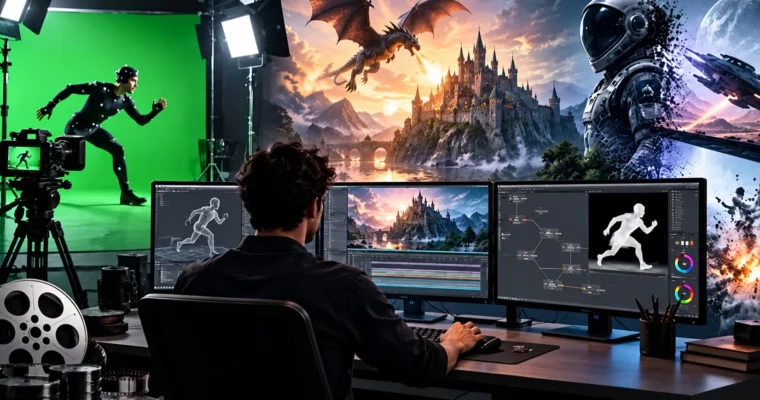
Learn how real VFX shots get built from roto and keying to tracking, FX and final grade.

If you have ever wondered how a shaky green-screen clip turns into a shot that looks real, this course walks you through the whole chain. You will touch roto, keying, motion graphics, tracking, color and FX, and put it together into finished comps.

🎯 What you’ll learn

  • Explain the full VFX pipeline from previs and on-set work to compositing and delivery
  • Do clean rotoscoping in Silhouette, including hair, stereo and point-tracked roto
  • Build motion graphics with keyframes, masks, kinetic typography and motion paths
  • Key green screens with Keylight, refine edges and fix spill with light wrap
  • Grade shots with color correction for consistent mood and story
  • Create fire, smoke, rain, snow and explosions with particle systems
  • Track shots with 2D, planar and 3D camera tracking and lock CG into footage
  • Finish polished comps with matte painting, multi-pass work and cleanup

✅ Requirements

  • Skills: Basic computer skills with files and media, no prior VFX job experience needed
  • Tools: Access to After Effects, Silhouette and Nuke or similar compositing tools shown in lessons
  • Hardware: Computer capable of running VFX and compositing software, plus internet for downloads and practice files

📝 Description

Preview: You get the full shot pipeline here, not just button clicks. We start with how VFX production actually runs, then get hands-on with rotoscoping, chroma keying and comp.

This is a very practical, follow-along setup. Short lessons, lots of reps. You will cut mattes, fix edges, track plates, add particle effects and grade everything so it cuts together. No long theory dumps — you learn a concept, then you apply it to footage right away.

You will spend real time in Adobe After Effects for layers, masks, kinetic type and motion graphics, then switch to Boris FX Silhouette for serious roto work like hair and moving cameras. Later sections bring in node-style thinking with Nuke workflows — Merge ops, IBK, paint, clean plates and 3D integration — so you understand both layer and node logic.

Tracking gets proper attention. You will compare point, planar and 3D camera tracking, solve cameras, clean up tracks and do screen replacements that stick. Same for keying: Keylight, spill control, light wrap and matte cleanup for those crunchy hair edges everyone struggles with.

The FX part is fun and direct. Fire, smoke, rain, snow, explosions, multi-pass compositing and HDR handling — all built to sell scale without looking pasted on. Plus cleanup tricks like wire removal, clone stamp paint and sky work that save bad plates.

🧑‍🎓 Who this course is for

  • Beginners who want a clear entry into VFX without getting lost in jargon
  • Students and aspiring VFX artists building roto, keying, tracking and comp skills
  • Future motion graphics artists who want to animate type, logos and infographics
  • Video editors and YouTubers who want to add green-screen, cleanup and FX to their work
  • Filmmakers who want to plan and shoot plates that are actually easy to comp later
  • Digital artists adding compositing and color workflows to their current toolkit

🧑‍🏫 About the Author

MKCL India is an eLearning team behind dozens of self-paced courses, with millions of learners across their programs. Their focus is learning by doing — short demos tied to small builds and assets.

On Udemy they hold a 4.2 instructor rating with over 10,000 reviews and 190K+ students across 51 courses. For this class that means structured lessons, repeatable compositing workflows and plenty of practice files to build muscle memory.

🏁 Final Result

  • Finished VFX shots combining tracked footage, keyed green-screen, roto mattes, matte painting / set extension, particle FX and final color grade — ready to cut into a junior comp reel.
Curriculum

📋 Course content

  1. Module 1:  VFX Foundations, Pipeline and Production Realities

    • Course Session Overview13:15
    • Course Objective2:22
    • Course Outcome2:23
    • Defining VFX and Its Role in Media3:38
    • Evolution Of VFX Techniques3:45
    • Historical Context And Notable VFX Milestones5:02
    • From Practical Effects To Digital VFX5:17
    • Pioneering Films and Artists4:39
    • VFX Pipeline Overview4:17
    • Pre-Production: Concept Art, Storyboarding, Previs5:15
    • Production: On-Set VFX (Green Screen, Motion Capture)5:06
    • Post-Production: Compositing, Rendering, Final Touches4:35
    • Collaboration Between Modeling, Texturing, Lighting, And Animation Teams5:16
    • Color Theory for VFX4:07
    • Color Psychology and Its Impact On Storytelling4:21
    • How Color Grading Enhances the Mood of VFX Shots4:29
    • Real-World Examples of Color Grading in VFX Films4:28
    • Understanding Motion Capture (MoCap)3:27
    • Types of Motion Capture (MoCap)5:56
    • Applications in Gaming, Film and Virtual Production5:22
    • Processes in Motion Capture (MoCap)5:57
    • Analyzing Iconic VFX Shots2:38
    • Deconstructing Shots from Popular Films3:38
    • Identifying VFX Elements In Iconic Scenes3:14
    • VFX Budgeting And Cost Estimation3:03
    • Factors Affecting VFX Budgets4:46
    • Balancing Quality and Cost in VFX3:56
  2. Module 2:  Rotoscoping in Silhouette
    • Interface5:00
    • Introduction to Silhouette, Nodes and Preferences4:14
    • Roto with Static Camera5:01
    • Roto with Linear Camera Movements5:53
    • Stereo Rotoscope6:15
    • Roto with Point Tracking5:47
    • Difference Between Mocha and Point Tracker4:15
    • Shape Based Tracking5:20
    • Roto of Hairs5:12
    • Render in Silhouette10:33
    • Case study – Rotoscoping16:41
  3. Module 3:  After Effects Essentials and Motion Graphics
    • Understanding the Interface5:11
    • Project and Composition Settings7:13
    • Importing Footage4:36
    • Basic Tools and Navigation5:45
    • Keyframe Animation Basics2:53
    • Working with Layers6:01
    • Understanding Timeline and Keyframes5:35
    • Basic Transform Properties (Position, Scale, Rotation, Opacity)5:41
    • Previewing and Rendering Basics6:02
    • Creating Text Layers9:20
    • Animating Text4:10
    • Advanced Text Animation Techniques8:17
    • Working with Masks9:39
    • Luma vs Alpha9:48
    • Text with Blend Modes3:20
    • Kinetic Typography7:01
    • Text and Typography Track Matte – Case Study7:30
    • Kinetic Typography – Case Study8:26
    • Principles of Motion Graphics6:01
    • Using Motion Paths4:25
    • Creating Infographics5:26
    • Animating Logos3:27
    • Basic Motion Tracking4:12
    • Advanced Motion Tracking Techniques2:24
    • Plugins for Effective Motion Graphics3:12
    • Using Effects and Animation Presets3:44
    • Advanced Animation Techniques4:46
    • Designing with Type and Kinetic Typography4:50
    • Working with Shape Layers4:50
    • Working with Keyframes4:12
    • Importing and Organizing Assets4:07
  4. Module 4:  Keying, Compositing and Matte Painting
    • Basics of Compositing4:17
    • Working with Multiple Compositions4:20
    • Introduction to Chroma Keying3:42
    • Linear Keying Explained4:24
    • Using Keylight for Chroma Screens4:33
    • Advanced Keying Techniques4:45
    • Rotoscoping Basics4:27
    • Advanced Rotoscoping Techniques4:11
    • Color Grading and Correction Overview4:59
    • Creative Color Grading Techniques3:41
    • Light Wrap Techniques for Seamless Compositing4:40
    • Edge Refinement and Matte Cleanup6:06
    • Introduction to Green Screen Keying5:44
    • Using Keylight for Keying4:53
    • Mastering Advanced Keying with Hair and Edge Control5:27
    • Creating and Using Matte Paintings5:15
    • Digital Set Extension Techniques5:06
    • Creating Matte Painting in After Effects5:02
  5. Module 5:  FX, Particles, 3D Space and Multi-Pass
    • Introduction to Special Effects (FX)3:41
    • Introduction to Special Effects in Adobe After Effects2:58
    • Creating Fire, Smoke, and Explosions5:19
    • Simulating Rain and Snow4:59
    • Using Particle Systems in Compositing5:32
    • Advanced Particle Effects5:36
    • Introduction to 3D Space4:50
    • Working with 3D Layers4:00
    • Animating Cameras in 3D Space4:40
    • Lighting in 3D Space4:18
    • Using 3D Plugins5:13
    • Audio in After Effects4:12
    • Creating 3D Cube6:08
    • Animate 3D Cube3:29
    • Using Audio to Drive Animation5:45
    • Depth of Field and Focus in 3D Camera5:02
    • Working with 3D Null Objects4:53
    • Introduction to Stereoscopic 3D6:04
    • Depth of Field5:23
    • Motion Blur3:48
    • Working with HDR Footage6:00
    • Base Effects in Multi-pass Compositing5:26
    • Fine Tuning Multi-pass Compositing5:56
  6. Module 6:  Cleanup, Plugins, Scripts and Automation
    • Paint and Wire Removal5:03
    • Introduction to the Paint Tool3:58
    • Using Clone Stamp and Eraser Tools5:33
    • Wire and Rig Removal Techniques6:02
    • Creating a Clean Plate5:06
    • VR and 360° Video Editing4:52
    • Installing and Managing Plugins4:49
    • Essential Plugins in Adobe After Effects5:35
    • Using Trapcode Suite5:21
    • Using Red Giant Universe Plugins4:32
    • Optical Flares Plugins4:19
    • Saber and FX Console Plugins4:36
    • Motion Bro and Deep Glow Plugins5:24
    • Introduction to Scripts in After Effects5:49
    • Using Scripts for Workflow Automation4:07
    • Advanced Expressions and Scripting5:00
    • Plugin Troubleshooting and Performance Optimization5:34
    • Using Presets and Script Based Templates5:32
  7. Module 7:  Camera Tracking – 2D, Planar and 3D
    • Introduction to Tracking and its Types5:34
    • Introduction to Camera Tracking Software9:19
    • Auto Tracking Fundamentals5:12
    • Camera Solving5:52
    • Adjusting Tracking3:56
    • Geometry Tracking4:41
    • Manual Tracking Techniques5:36
    • Exporting Shapes in After Effects and Nuke4:55
    • Case Study – Tracking7:11
  8. Module 8:  Node-Based Compositing Workflow
    • Interface and Navigation6:01
    • Basic Compositing Workflow4:59
    • Introduction To Rotoscoping6:57
    • Introducing the Concept of Keying4:24
    • Edge Refinement3:57
    • Over and Bounding Box2:47
    • From and Minus3:36
    • In and Out2:46
    • Color Correction Techniques4:57
    • Transform Mask6:43
    • Log Footage2:51
    • Intermediate Compositing Techniques – Case Study4:17
    • Keylight4:31
    • IBK4:47
    • Lightwrap3:23
    • Advanced Color Grading Techniques4:26
    • Introduction to 3D Space4:41
    • Matte Painting5:57
    • Integrating Chroma Keying Using 3D Space4:18
    • Introduction to Paint4:56
    • Clean Plate3:42
    • Divide and Multiply Operation3:30
    • Demonstration of Tracking Nodes1:52
    • Point Tracking5:24
    • Screen Replacement4:46
    • Roto with Planar Tracking5:22
    • Camera Tracking6:04
    • Point Cloud Generator4:06
    • Integrate 3D Objects6:00
Watch online or Download for Free
VFX & Animation Masterclass – Compositing, Tracking & Effects by MKCL India
NAME
SIZEDURATION

Download all Videos (166)
1.5 GB13h 54m


Download all

Join us on
  Channel    and      Group

Leave a Comment

Your email address will not be published. Required fields are marked *