It looks like you're using an adblocker.
Adblockers make us sad. We use ads to keep our content happy and free. If you like what we are doing please consider supporting us by whitelisting our website. You can report badly-behaved ads by clicking/tapping the nearby 'Advertisement' X text.
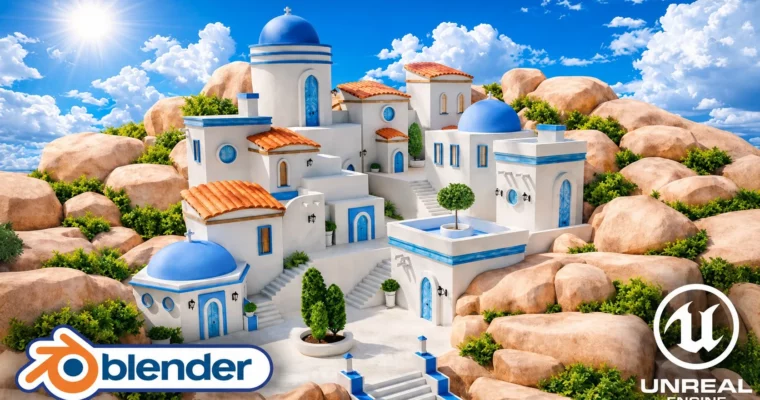
Blender to Unreal Engine 5 Stylized Greek Environment by 3D Tudor
Build a reusable modular Greek island architecture kit in Blender, export it cleanly via GLB, and assemble a polished, stylized village in Unreal Engine 5.
Build a reusable modular Greek island architecture kit in Blender, then export it cleanly via GLB and assemble a polished, stylized village in Unreal Engine 5. This course focuses on the full production pipeline, from planning and modeling to lighting and final cinematic presentation.
🎯 What you’ll learn
Plan a stylized environment with references, human scale, blockouts, and silhouette checks
Build a reusable modular Greek island architecture kit with buildings, roofs, stairs, doors, and props
Create clean UVs and seamless materials with controlled texel density and tile variation
Export a clean GLB asset library with useful pivots and separate meshes for Unreal Engine 5
Assemble a layered village with a clear focal point, rock foundation, and supporting foliage
Present the finished environment with a cinematic 16:9 camera, simple animation, and final video render
✅ Requirements
Skills: Basic navigation in Blender and Unreal Engine 5 is helpful, but the full workflow is shown step by step.
Tools: A computer capable of running Blender and Unreal Engine 5.
This course isn’t about making one building and hoping nobody notices the seams. It’s about building a modular environment-art workflow that actually works from start to finish.
You’ll start in Blender, planning your stylized Greek village with references, human scale, and blockouts. Then you’ll build a reusable kit of white-plaster buildings, blue domes, terracotta roofs, stairs, doors, windows, lanterns, and props. The focus is on clean geometry, useful pivots, and consistent UVs so every piece snaps together like a real building block.
Once the kit is ready, you’ll export it through GLB and bring it into Unreal Engine 5. This is where most courses gloss over the hard parts. Here, you’ll fix tangents, set up a custom skybox, dial in the sun and fog, and assemble the village from separate, editable meshes. You’ll also create custom shrubs using procedural vegetation tools and place them for natural-looking clusters.
The final stage covers color grading, CineCamera framing, and a simple camera animation for a polished real-time render. The result is a complete, portfolio-ready environment and a repeatable pipeline you can use for any future project.
🧑🎓 Who this course is for
Blender artists ready to go beyond isolated props who want a clear system for building complete environments
Stylized environment artists and worldbuilders who want strong shapes, clean color separation, and reusable architecture
Unreal Engine learners who want to understand why pivots, normals, tangents, and UVs matter in the Blender hand-off
Indie game developers and technical artists who need practical, editable modular building blocks
Portfolio builders who want one project covering modeling, UVs, modular design, engine assembly, lighting, and presentation
🧑🏫 About the Author
3D Tudor is a well-known instructor on Udemy, specializing in Blender and Unreal Engine environment art. With a focus on practical, project-based learning, 3D Tudor has created multiple top-rated courses that guide students through complete production pipelines. Their teaching style emphasizes clean workflows, modular design, and real-world problem-solving, making complex topics accessible to intermediate artists.
🏁 Final Result
A complete, stylized Greek island environment presented in Unreal Engine 5
A reusable modular asset workflow rather than a one-off scene recipe
A clean GLB asset library with practical pivots and separate meshes
A polished hero image and optional short CineCamera animation
Curriculum
📋 Course content
Module 1: Blender Foundation & Modular Kit
Lesson 1 – Setting Up the Blender Resource Pack for Unreal Engine8:22
Lesson 2 – Bevel and Weighted Normal Modifiers for Clean Bases13:18
Lesson 3 – Building Scaled Primitives with Bevel and Cylinders15:18




 Channel