Ad Clicks : Ad Views : Ad Clicks : Ad Views : Ad Clicks : Ad Views : Ad Clicks : Ad Views :
Oh Snap!

It looks like you're using an adblocker. Adblockers make us sad. We use ads to keep our content happy and free. If you like what we are doing please consider supporting us by whitelisting our website. You can report badly-behaved ads by clicking/tapping the nearby 'Advertisement' X text.

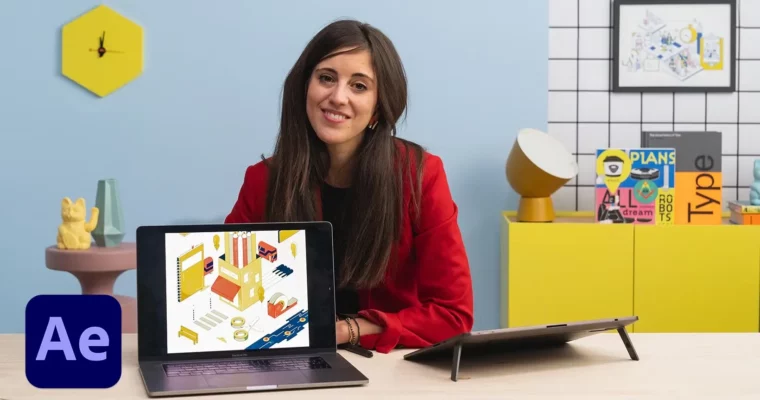
Isometric Animation by Illustrator and After Effects by Ana Pérez López

Isometric Animation by Illustrator and After Effects by Ana Pérez López

Author:Illustrator and After Effects by Ana Pérez López

Actual Duration:7h 42m

Release date:2023, March

Publisher:Domestika

Skill level:Intermediate

Language:English

Exercise files:Yes

Software:Adobe Illustrator, Adobe After Effects, Adobe Photoshop

Course URL:https://www.domestika.org/en/courses/3552-isometric-animation-with-illustrator-and-after-effects

Learn to create isometric illustrations in Illustrator and bring them to life with dynamic animation in After Effects.

This course teaches you how to build isometric illustrations from scratch in Adobe Illustrator and then animate them in After Effects. You’ll go from a rough sketch to a polished, moving sticker of a neighborhood business, learning how perspective, color, and motion work together.

🎯 What you’ll learn

  • Create isometric grids and compositions in Illustrator
  • Apply color, lighting, and texture to flat vector shapes
  • Set up animation layers and organize files for After Effects
  • Animate objects with keyframes and export as GIFs or stickers

✅ Requirements

  • Skills: Basic knowledge of Adobe Illustrator, Photoshop, and After Effects
  • Tools: Computer with access to Adobe Illustrator, Photoshop, and After Effects

📝 Description

This isn’t just about drawing cubes. Ana Pérez López shows you how to use isometric perspective as a creative tool, not a rigid grid. You’ll start by finding ideas and sketching freely, then move into Illustrator to build clean, colored illustrations with depth and texture.

The real magic happens when you bring those flat shapes into After Effects. Ana walks you through setting up layers, organizing files, and animating objects so they feel alive. You’ll learn to loop movements, add secondary motion, and export your work as stickers for Instagram or GIFs for the web. It’s a practical pipeline for turning static vectors into shareable, animated art.

🧑‍🎓 Who this course is for

  • Illustrators who want to add motion to their work
  • Animators looking to explore isometric style
  • Designers curious about combining vector art with 2D animation

🧑‍🏫 About the Author

Ana Pérez López is a Madrid-born illustrator and animation director based in London. She started as a journalist before switching to visual storytelling, studying animation in California. Her work blends expressive color, playful shapes, and surreal perspective. She’s worked with Samsung, Spotify, The New York Times, and CNN London, and her short films have screened at SXSW and Slamdance. She won a Young Guns award in 2020 and an Emmy for her work on an animated short for CNN.

🏁 Final Result

  • An animated isometric sticker of a neighborhood business, ready to share on social media or use in personal projects.
Curriculum

📋 Course content

  1. Introduction:  About Me, Influences
  2. Fun and Freedom Within a Grid:  An Introduction to Isometric Illustration, How to Find an Idea, Sketch! Sketch! Sketch! 1, Sketch! Sketch! Sketch! 2
  3. Making the Illustration:  Clean Lines 1, Clean Lines 2, Clean Lines 3, How to Color the Illustration 1, How to Color the Illustration 2, Adding Dimension with Lights and Shadows 1, Adding Dimension with Lights and Shadows 2, Textures 1, Textures 2, Textures 3
  4. Bringing the Illustration to Life:  Preparing the Animation: Layers, Folder Organizing and File Setup 1, Folder Organizing and File Setup 2, Animating the Main Objects 1, Animating the Main Objects 2, Animating the Main Objects 3, Animating the Main Objects 4, Animating the Main Objects 5, Animating Other Objects 1, Animating Other Objects 2, Animating Other Objects 3, Exporting
  5. Making Stickers for Instagram Stories:  After Effects: Exporting with an Alpha Channel, Turning the Animation into a GIF, How to Upload It to GIPHY
Watch online or Download for Free
Isometric Animation by Illustrator and After Effects by Ana Pérez López
NAME
SIZEDURATION
U1 Introduction
41 MB13m
Additional resources
5.2 MB5m
01_Empty_Full_Project_Folder
5.2 MB5m
03_animation
5.2 MB5m
03_plug ins
5.2 MB5m
EaseCopy_v1.7
5.2 MB5m
Tutorial
5.2 MB5m
1 About me
16.5 MB3m
2 Influences
19.3 MB4m
U2 Fun and Freedom Within a Grid
127.4 MB1h 7m
Additional resources
5.2 MB5m
01_Empty_Full_Project_Folder
5.2 MB5m
03_animation
5.2 MB5m
03_plug ins
5.2 MB5m
EaseCopy_v1.7
5.2 MB5m
Tutorial
5.2 MB5m
U4 Bringing the Illustration to Life
239.4 MB3h 23m
Additional resources
15.4 MB6m
01_ArtStore_Islington-Full Project
15.4 MB6m
01_inspiration
9.8 MB0m
01_Images
9.8 MB0m
03_animation
5.2 MB5m
03_plug ins
5.2 MB5m
EaseCopy_v1.7
5.2 MB5m
Tutorial
5.2 MB5m
04_deliveries
454.9 KB0m
03_MP4
266 KB0m
04_Sticker
188.9 KB0m
12 Exporting
11.5 MB7m
U5 Making Stickers for Instagram Stories
25.6 MB13m
U6 Final Project
7.4 MB2m

Download all Videos (40)
651.3 MB7h 42m


Download all

Join us on
  Channel    and      Group

Leave a Comment

Your email address will not be published. Required fields are marked *