Learn Procedural Game Environments in Unreal Engine 57 by Jan Benkwtiz

Duration:11.5 hours on-demand video
Actual Duration:11h 35m
Release date:2026
Publisher:Udemy
Skill level:Intermediate
Language:English
Exercise files:Yes
Software:Unreal Engine 5.7, SpeedTree 10, Blender, GAEA
Course URL:https://www.udemy.com/course/learn-procedural-game-environments-in-unreal-engine-57
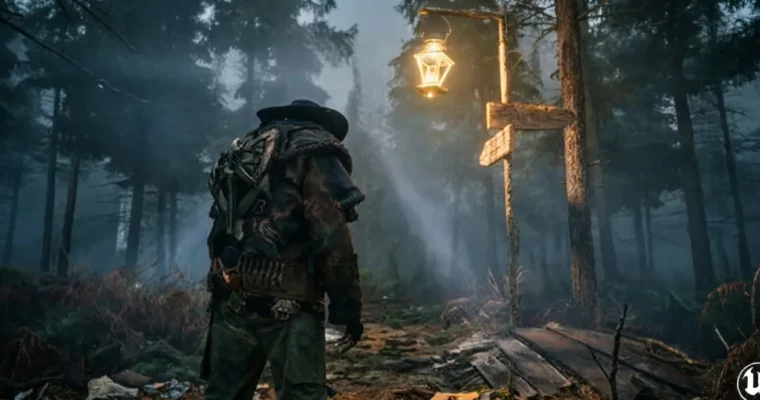
Ready to craft some seriously spooky game worlds? This course dives headfirst into building dark, Nordic forest environments using the latest Unreal Engine 5.7 tools. You’ll go from a blank project to a fully playable scene, complete with a haunted house and all the creepy details that make a horror game shine.
🎯 What you’ll learn
- Scatter trees, rocks, grass, and more using the powerful PCG framework.
- Place foliage precisely with the new PCG spline tool.
- Build displaced Nanite paths with mud, stones, and puddles.
- Integrate Spline Data into PCG workflows.
- Create and import custom landscape height maps.
- Apply advanced 3-layer masks for realistic terrain.
- Use Nanite tessellation for detailed near-distance soil.
- Design and integrate pine trees using SpeedTree 10.
- Import a Victorian haunted house and use PCG to carve out clearings.
- Achieve cinematic Lumen lighting with fog and god-rays.
- Add atmospheric details like animated lanterns, footstep SFX, and ambient audio.
- Retarget animations for smooth third-person character movement.
✅ Requirements
- Skills: Basic knowledge in Unreal Engine.
- Tools: Blender and GAEA are optional.
📝 Description
This course is all about diving deep into professional game environment creation using Unreal Engine 5.7. You’ll build a complete, playable dark Nordic forest scene, perfect for horror or adventure games. We’ll cover everything from creating custom landscapes with advanced materials and Nanite tessellation to scattering foliage with the powerful PCG framework and its new spline tools. You’ll learn to integrate assets like a Victorian haunted house, set up cinematic Lumen lighting, and add immersive atmospheric details like sound effects and animations. The course includes all project files and custom assets, meaning no extra purchases are needed. By the end, you’ll have a portfolio-ready level and the confidence to create your own professional game environments.
🧑🎓 Who this course is for
- Game Environment Artists looking to expand their skills.
- VR Creators aiming for realistic virtual spaces.
- 3D Artists interested in bringing their work into interactive game engines.
🧑🏫 About the Author
Jan Benkwtiz is an instructor with a passion for bridging the gap between 3D art and interactive game development. With 1,972 students and 11 courses, Jan focuses on teaching artists how to bring their creations to life in Unreal Engine 5. He’s active on YouTube, where you can find more free tutorials on Blender and Unreal Engine. His goal is to empower artists to move from asset creation in Blender to building interactive experiences in Unreal Engine.
🏁 Final Result
- A portfolio-ready, playable dark Nordic forest level featuring a haunted house, complete with custom landscapes, atmospheric lighting, sound effects, and character animations.
 Channel