It looks like you're using an adblocker.
Adblockers make us sad. We use ads to keep our content happy and free. If you like what we are doing please consider supporting us by whitelisting our website. You can report badly-behaved ads by clicking/tapping the nearby 'Advertisement' X text.
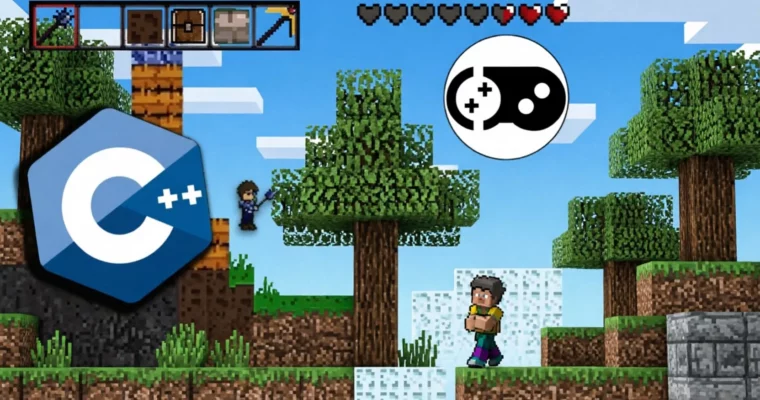
C++ Gamedev course for beginners – Your first big C++ game by Low Level Game Dev
Learn to build your first substantial C++ game from scratch, mastering essential development tools and techniques.
Ready to build your first big game in C++? This course is your direct path from beginner to intermediate, focusing on making a Terraria-like game from the ground up. You’ll learn not just how to code, but how to structure your projects cleanly, use essential tools like CMake and Git, and even dive into procedural world generation. Forget copying code; this course emphasizes learning by doing with over 50 challenges designed to solidify your understanding and build real skills.
🎯 What you’ll learn
Build your first substantial C++ game.
Progress your C++ journey from beginner to intermediate.
Learn to architect C++ projects cleanly.
Master CMake for build system management.
Understand the basics of Git for version control.
Generate procedural worlds.
Properly save game data to prevent corruption and support older save files.
Access free resources to help you ship your game on Steam.
Learn to find assets for your game.
✅ Requirements
Skills: Basic C++ programming experience. You should know what a class/struct is and be comfortable writing C++ programs that are a few hundred lines of code.
Tools: A computer capable of running a C++ compiler and IDE.
Hardware: A computer capable of running C++ development tools.
📝 Description
This course is designed for beginner to intermediate C++ game developers who are eager to create their first big C++ game from scratch. If you’ve ever felt overwhelmed by setting up projects, linking libraries, or structuring your code, this course offers a clear, step-by-step solution. We’ll build a Terraria-like game together, a project that’s accessible for beginners but rich with possibilities for expansion. You’ll learn crucial skills like CMake for build system management and Git for version control, ensuring your projects are well-organized and maintainable.
The content is meticulously planned and edited, offering over 6.5 hours of video that go beyond simple code-along sessions. Each lesson is paired with challenges that encourage you to actively apply what you’ve learned, fostering true understanding and problem-solving abilities. You’ll gain insights into game architecture, asset management, procedural generation using techniques like Perlin noise, and robust data saving systems to prevent corrupt files. The course also covers fundamental game math, physics, and collision detection, along with structuring game entities and implementing UI and sound systems.
This isn’t just about finishing a project; it’s about building the confidence and skills to tackle future C++ game development endeavors independently. You’ll also get practical advice on preparing your game for release, including basics on shipping on Steam, and access to valuable free resources to continue your learning journey.
🧑🎓 Who this course is for
C++ beginners who want to make games from scratch in C++.
Beginners struggling to make their first large C++ game, or those whose initial projects lacked maintainability and structure.
Individuals who want to build a game from scratch in C++ but find the initial steps of linking libraries and drawing graphics challenging.
C++ beginners who have already created a simple C++ game and are looking to expand their knowledge and skills.
🧑🏫 About the Author
Low Level Game Dev is passionate about making games in C++ with OpenGL from scratch. Their focus has been dedicated to these areas, leading to significant projects like a released Steam game, a custom game engine, and various game development libraries such as GL2D and GL3D. You can find their work and tutorials on YouTube under the name LowLevelGameDev. With 10 years of experience and a deep understanding of C++ game development, Low Level Game Dev aims to provide a shortcut for aspiring developers, helping them achieve similar project goals much faster than they did.
🏁 Final Result
A completed, portfolio-ready Terraria-like game built from scratch using C++.
A solid understanding of game architecture, CMake, Git, and procedural generation.
The ability to independently structure, develop, and manage larger C++ game projects.
Practical knowledge of implementing core game systems like maps, entities, UI, and saving/loading.
Foundational skills in game math, physics, and collision detection.
An understanding of how to prepare a game for potential release, including basics for shipping on Steam.
Curriculum
📋 Course content
Introduction
Introduction
Note on Udemy video player
A word about challenges
Let’s code faster
A word about debugging
The Build System
The Build System
How to Open a CMake Project
Challenge: Open The CMake project
CMake Tutorial
Challenge make some simple CMake projects
Making the CMake for the Game
If you skipped the CMake lessons download the start of the project here
Git introduction
Git introduction
Challenge Make a cool Github page for your game
Git Cheat Sheet
Raylib window
Railib window
Opening a Raylib window challenges
Setup Imgui
Setup Imgui
Challenge take a look at ImGUI
Using Imgui
Challenge play around with ImGui!
Challenge: custom ImGui theme!
Game Architecture
Game Architecture
Challenge check closeGame()
Delta Time
Delta Time Quiz
Asserts
Challenge make this setup as your C++ game setup
Asset Manager
Asset Manager
Challenge find assets
Game Map
Game Map
Challenge, learn to edit assets
Camera
Camera
Texture atlas
World Generation
Easy Challenge play around with a world gen
Challenge, add your own block
Block placement and breaking
Challenge Simple Block Selector
Small world rendering optimization
Easi Challenge, play around with the viewing area
Challenge, render trees more nicely
Challenge, wall blocks
Random Number Generators
Random Number Generators – Basics to advance
Random Numbers Cheat Sheet
Challenge with random numbers!
Challenge + New concepts: biasing random numbers!
Procedural World Generation
Procedural world generation basics
Challenge: World Generator without noise
Procedural world generation part 2
Perlin noise introduction + fast noise SIMD library
Noise Cheat Sheet
Challenge Play around with this tool
Using perlin noise
Challenge Play around with noises + The most important function in Gamedev!
Combining noise with not using noise
Challenge try to implement yourself what I did in the last lesson
Biomes
Biomes
Challenge find some more biomes
Caves
Caves using perlin noise
Challenge with Caves
Caves using Perlin Worms
Challenge with Perlin worms!
Select blocks from ImGui
Select blocks from ImGui
Challenge
Saving Data Binary
Saving Data Binary
Challenge Read/Write entire file
Copy Pasting Structures From Disk
Copy Pasting Structures From Disk
Future Proofing the Saving System
Challenge, future proffing the saving system
Adding Structures to the World Generator
Adding Structures to the World Generator
Challenge Make this world generator your own!
Your World Generator
Vectors
Vectors
Vectors Cheat Sheet
Vectors Quiz + Recap
Challenge Vectors
Basic Forces
Basic Forces
Challenge with basic physics
Collisions
Collisions
Enemies
Enemies
Enemy Behaviour
Enemy Animations
Challenge, make a texture pack loader
More Enemies
More Entity Types
More Entity Types
A quick word about tagged unions
Dropped Item Entity
Challenge with DroppedItemEntity
Player Entity
Entity Life
Challenge, entities dropping loot
Challenge, spawn enemies
Challenge Make your own entity/enemy!
Items
Items
Challenge Items
Clip Camera
Clip Camera
Settings
Settings
Sound System
Sound System
Challenge: Sounds
Music
Saving Data Text Based
Saving Data Text Based
Challenge: Make your own key value saving libray!
Background + Paralax
Background + Paralax
Challenge look into filtering modes
Challenge: Paralax on multiple layers + Day/Night cycle
Background Transition Based on Biome
Background Transition Based on Biome
Challenge: Music Transitions + Dynamic Biomes
Player Animations
Player Animations
Render Player Armour with Animations
Fixing the Super Annoying Texture Atlas Bug
Fixing the Super Annoying Texture Atlas Bug
Challenge: fixing the visual bug the hard way!
Saving World Data
Saving World Data
Saving Entities
Challenge Fixing A Broken Save File
Preventing Corrupt Save Files
Challenge When to save the world
Display Player Life
Display Player Life
Challenge Animated Hearts
UI Helpers And Regions
UI Helpers And Regions
Challenge: UI helpers
Inventory UI
Inventory UI part 1
Inventory UI part 2
Challenge: Inventory
Challenge: more expressive UI
Main Menu UI
Refactoring Before Implementing the Main Menu
Main Menu UI Part 1
Challenge, animate the background in the Main Menu!
Main Menu UI Part 2
Challenge, extract the button function
Main Menu UI Part 3
Challenge: Expand the Menu UI system
Challenge, look into raygui
Shipping The Game
Shipping The Game + Extra Feature ideas for you to add
Final Challenge! Continue on your own!
A word about game design
Look into Data Oriented Design!
Shipping the game on Steam
Other Cool resources!
Watch online or Download for Free
C++ Gamedev course for beginners – Your first big C++ game by Low Level Game Dev
love to see the online courses club being back. lots of good stuff getting uploaded. hopefully groupbuy club follows up soon. would love to see some of the coloso art courses get distributed




 Channel



love to see the online courses club being back. lots of good stuff getting uploaded. hopefully groupbuy club follows up soon. would love to see some of the coloso art courses get distributed
just threw in a couple of fixes on occ, gonna switch to gbc in a week or so