Ad Clicks : Ad Views : Ad Clicks : Ad Views : Ad Clicks : Ad Views : Ad Clicks : Ad Views :
Oh Snap!

It looks like you're using an adblocker. Adblockers make us sad. We use ads to keep our content happy and free. If you like what we are doing please consider supporting us by whitelisting our website. You can report badly-behaved ads by clicking/tapping the nearby 'Advertisement' X text.

Unity Pro Builder Warehouse by Pete Jepson

Unity Pro Builder Warehouse by Pete Jepson

/

Author:Pete Jepson

Duration:15.5 hours on-demand video

Release date:2024, September

Publisher:Udemy

Skill level:Intermediate

Language:English

Exercise files:Yes

Software:Unity, Pro Builder

Course URL:https://www.udemy.com/course/unity-pro-builder-warehouse/

Learn to design and build modular 3D assets directly within Unity using Pro Builder, from modeling to AAA-quality lighting.

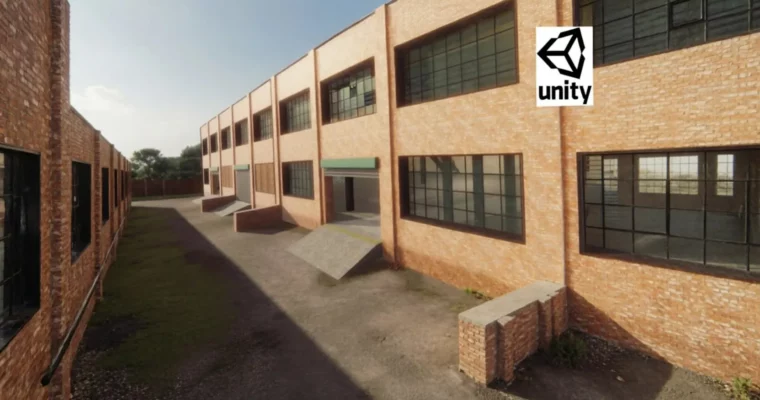
Ready to ditch external software and build awesome 3D environments right inside Unity? This course dives deep into Pro Builder, showing you how to create modular assets for your games. You’ll go from a blank scene to a fully textured, professionally lit warehouse, perfect for your next game development project.

🎯 What you’ll learn

  • Model 3D assets directly within Unity using Pro Builder.
  • Develop a professional workflow for creating modular game assets.
  • Texture and set up materials for your 3D models.
  • Assemble modular pieces into complex layouts.
  • Implement professional light baking and post-processing effects.

✅ Requirements

  • Hardware: A computer capable of running Unity 2021.

📝 Description

This course is all about mastering Unity Pro Builder to construct a modular warehouse. You’ll learn to model and texture individual pieces that snap together, allowing for flexible and reusable game assets. The instructor guides you through a professional workflow, starting from scratch and building up to a complete project. You’ll discover how to create a variety of modular components, assemble them into detailed structures, and then enhance the scene with realistic textures, light baking, and post-processing effects to achieve a AAA visual quality. By the end, you’ll be proficient with Pro Builder and ready to design your own 3D assets directly within Unity.

🧑‍🎓 Who this course is for:

  • Anyone looking to create awesome games in Unity.
  • Individuals who want to build their own 3D models and game environments without leaving Unity.

🧑‍🏫 About the Author

Pete Jepson is a qualified teacher with over 12 years of experience in game design education. He’s been using Unity since 2013 and has created numerous courses focused on game engine development. With a large global student base, Pete is dedicated to supporting learners and is readily available to answer questions and provide assistance throughout your learning journey.

🏁 Final Result

  • A portfolio-ready, modular warehouse environment built and textured within Unity, complete with professional lighting and post-processing effects.

Curriculum

📋 Course content

  1. Introduction
    • Introduction2:36
    • Install Pro Builder13:39
    • Install First Person Controller2:10
  2. Pro Builder Basics
    • Pro Builder Basics15:48
    • Pro Builder tools9:17
    • Vertex mode7:39
    • Edge mode8:41
    • Face mode7:39
  3. Modular Design Fundamentals
    • Example rooms15:10
    • Starting a modular layout7:19
    • Setting up player character8:11
    • Creating a modular section7:53
    • Creating the roof14:12
    • Finishing the roof details8:36
    • Creating windows6:39
    • Window details8:44
    • Finishing the window6:36
    • Skirting board4:30
  4. Texturing Workflow
    • Download textures2:11
    • Setting up materials11:49
    • Adding materials13:10
    • Outer wall textures11:56
    • Finishing wall texturing9:27
    • Window texturing9:22
    • Cutting out windows5:07
    • Texturing the cut out windows2:52
  5. Advanced Modular Construction
    • Guttering14:59
    • Decals10:28
    • Entrance12:30
    • Roller shutter texture7:48
    • Upper platform14:20
    • Stairs9:42
    • Finishing the stairs28:35
    • Modular upper floor4:11
    • End piece9:39
    • Roof details7:40
    • Roof materials3:16
    • Pipes14:18
  6. Prop Creation and Detailing
    • Brick prop8:55
    • Props12:05
    • Lightshade11:27
    • Shelving8:41
    • Tall shelf9:29
    • Industrial Tank8:51
    • Valve wheels14:09
  7. Interior Scene Assembly
    • Room walls16:52
    • Adding a door11:17
    • Door details13:37
    • Wall texturing14:06
    • Inside wall7:26
    • Floor and ceiling9:46
    • Light and light switch13:09
    • Desk9:08
    • Room props6:33
    • Vent shaft10:01
    • Second level floor8:25
    • Adding more decals12:04
    • Outside ramp6:58
    • Separating out the items19:44
    • End wall9:49
    • Finishing items16:13
  8. Exporting and Prefabs
    • Exporting objects9:09
    • Prefabs4:55
    • Checking the prefabs3:44
    • Modular layout12:22
    • Adding details8:15
    • Adding props14:01
    • Adding more props13:07
    • Room layout17:51
    • Room props13:00
    • Upper floor13:25
    • Walling off middle section9:47
    • Piping14:45
    • Middle section12:24
    • Upper room7:16
    • Upper floor props7:34
    • End section7:40
    • Vent shafts7:58
    • Guttering11:10
    • Adding decals4:52
  9. Lighting and Post-Processing
    • Ground texturing14:04
    • HDRI sky map7:26
    • Terrain resizing14:35
    • Setting up for lightmapping21:34
    • Baking lightmaps14:05
    • Baking the final lightmap5:00
    • Light baking result13:36
    • Post Processing13:01
    • Anti Aliasing3:45
    • Night time scene15:13
    • Course completion1:27
Watch online or Download for Free
Unity Pro Builder Warehouse by Pete Jepson
NAME
SIZEDURATION
2. Pro Builder Basics
843.8 MB
5. Props
1.5 GB


Join us on
  Channel    and      Group

Leave a Comment

Your email address will not be published. Required fields are marked *