

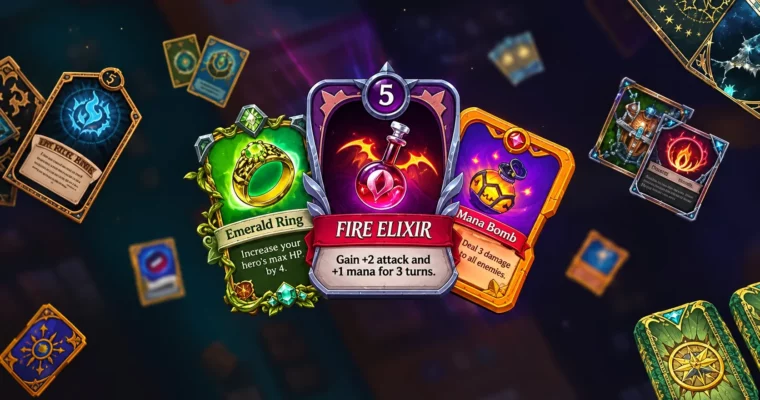
UI Design for Games by Grafit Studio
Duration:8h 11m
Release date:2026, May
Publisher:Udemy
Skill level:Intermediate
Language:English
Exercise files:Yes
Software:Adobe Photoshop, Procreate, PaintTool SAI
Course URL:https://www.udemy.com/course/game-ui-design
Want to get hired as a game UI artist? This course skips the UX theory and gets straight to pixels. You’ll take one card game from blank flow to a finished, portfolio-ready UI package.
🎯 What you’ll learn
- How to collect references and build mood/ref boards
- Work with prototypes, screen flow, blocks and adaptivity
- Work with color, composition and visual readability
- Create icons, HUD buttons, windows, cards and props
- Design cards with textures, symmetry tools and UI kits
- Game logo design and working with fonts for UI
- Render techniques with masks, layer styles and blending modes
- Proper export for developers and portfolio presentation
✅ Requirements
- Skills: Beginner-level drawing skills, basic knowledge of Photoshop or other drawing software, familiarity with fundamental CG terms
- Tools: Adobe Photoshop (Procreate or PaintTool SAI as alternative), drawing tablet
- Hardware: PC or Mac capable of running Photoshop
📝 Description
This is pure visual game UI, no long UX lectures. You pick a card game as your test project and build everything it needs: flow, windows, HUD, cards, buttons, icons, items. Short, practical tasks. You draw, you fix, you move on.
The workflow is straight production. You start with wireframes and ref boards, then lock composition and color. Then you go into Photoshop tools that actually matter for UI: masks, layer styles, grids, blending modes, blurs and overlays. Same approach works in Procreate or SAI if that’s what you draw in.
Mid-course gets fun. You’ll tackle card design with textures and symmetry, draw props in simple perspective, and push icons with light, shadow and shape language. Then you wrap it with a game logo and typography that doesn’t break readability.
Last part is about getting work. You’ll structure your own UI kit, prep assets for developers, export correctly, and lay out a clean portfolio case. No fluff, just screens that look like you already shipped a game.
🧑🎓 Who this course is for
- Junior artists who want to break into game UI and need a solid portfolio piece
- Mid-level artists and illustrators who want to tighten up icons, windows, cards and presentation
🧑🏫 About the Author
Grafit Studio is a team of practicing game artists focused on game UI and 2D production. They work on real mobile and PC games, doing interfaces, icons, cards and promo art day to day. Their teaching is built around the Photoshop production pipeline — what studios actually expect from a junior/middle UI artist.
🏁 Final Result
- Complete card game UI project with flow, HUD, pop-up windows, cards, items, icons and logo — laid out as a portfolio-ready case
 Channel