

Ad Clicks : Ad Views : Ad Clicks : Ad Views : Ad Clicks : Ad Views : Ad Clicks : Ad Views :
Oh Snap!

It looks like you're using an adblocker. Adblockers make us sad. We use ads to keep our content happy and free. If you like what we are doing please consider supporting us by whitelisting our website. You can report badly-behaved ads by clicking/tapping the nearby 'Advertisement' X text.

SmartPoly – Unreal Engine 5 – Multiplayer Survival Game Course by Eric Ruts

SmartPoly – Unreal Engine 5 – Multiplayer Survival Game Course by Eric Ruts

/

Author:Eric Ruts

Duration:32.5 hours on-demand video

Release date:2026, June

Publisher:Udemy

Skill level:Intermediate

Language:English

Exercise files:Yes

Software:Unreal Engine 5, Blueprints

Course URL:https://www.udemy.com/course/unreal-engine-5-survival-framework-multiplayer-game-dev

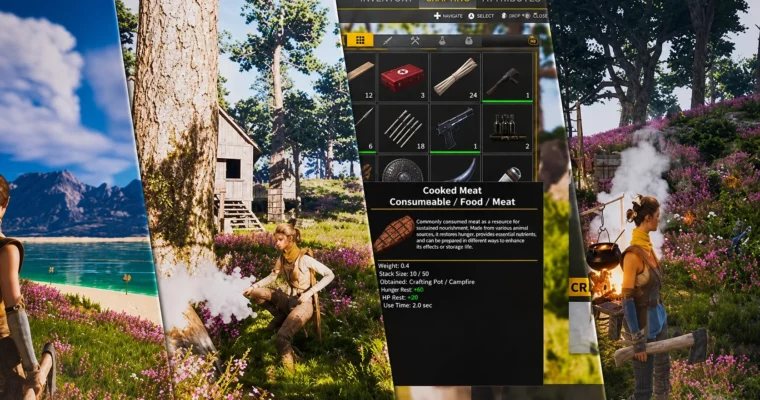
Build a fully playable multiplayer survival game in UE5 using only Blueprints — from movement and inventory to combat, building, and replication.

Want to stop following isolated tutorials and actually ship a survival game that works online? This course walks you through a full multiplayer survival framework in UE5, all in Blueprints.

🎯 What you’ll learn

  • Structure a multiplayer survival project with clean, modular game architecture
  • Work with Blueprint functions, macros, interfaces, variables, and abstract components
  • Set up multiplayer networking and replication for characters, items, and actions
  • Build smooth third-person locomotion with an extended movement component
  • Create dynamic footstep sounds based on physical surfaces and terrain
  • Design main menu, in-game menu, HUD, and reusable widgets
  • Implement interaction tracing, attribute management, and damage handling
  • Build inventory with drag-and-drop, consumables, drops, and storage chests
  • Implement crafting recipes, equipment slots, and visual attachment
  • Develop melee combat, ragdoll deaths, and respawn logic
  • Create choppable trees with material masks, splitting, and resource drops
  • Build a modular building system with snapping, overlap checks, and placement trace
  • Set up basic AI with Behavior Trees, Blackboards, and attacks

✅ Requirements

  • Skills: Basic understanding of Unreal Engine 5 and programming experience, able to listen and read in English
  • Tools: Unreal Engine 5 installed, standard 3-button mouse and keyboard
  • Hardware: PC capable of running UE5, dedicated GPU recommended for testing multiplayer and landscapes

📝 Description

Preview: You get a full survival loop built live — move, eat, chop, craft, build, fight, die, respawn — all working in multiplayer with clean Blueprints you can actually reuse.

This is not a tips-and-tricks collection. It is a start-to-finish framework for a multiplayer survival game in Unreal Engine 5. You start with project setup, custom classes, and engine settings, then lay down the architecture: how data flows, where logic lives, and how abstract components talk to each other without turning into spaghetti.

From there you build the world and the player. That means auto landscape materials with slope and height blending, grass foliage, water, lighting and fog, plus a third-person character with extended movement, input mapping, montages, and terrain-based footsteps using physical surfaces and traces.

Then comes the survival part. You will wire up menus and UMG widgets, interaction traces and interfaces, health / food / hydration with timers and damage events, plus ragdoll on death and a proper respawn handler. The big middle block is inventory, crafting, and equipment: data tables, pickup masters, drag-and-drop slots, consume / drop actions, recipe checks, craft progress, equip visuals, and multiplayer replication for all of it.

Last stretch is where it gets fun: melee combat with anim notifies and damage, choppable trees with material masks and splitting, a modular building system with snapping and overlap checks, and basic AI using Behavior Trees and Blackboards. Every system is built to be pulled apart — take only what you need for your own project.

The teaching style is very practical. Short intro, show the result of the chapter, then build it piece by piece. You also get quizzes to check you actually understood the architecture, not just copied nodes.

🧑‍🎓 Who this course is for

  • Intermediates who want a refresher plus real framework habits they probably missed
  • Aspiring game developers who want to build a survival game from zero to playable multiplayer
  • UE5 developers who want to understand modular systems for inventory, crafting, building, and combat

🧑‍🏫 About the Author

Eric Ruts is Company Lead of Games by Hyper and creator of the SmartPoly survival framework courses. He focuses on structured Blueprint development for Unreal Engine 5, with an emphasis on modular design, clean data flow, and systems that hold up in multiplayer. His courses are known for long-form, build-it-with-me projects covering survival mechanics, UI, AI, and optimization for real games.

🏁 Final Result

  • A playable multiplayer survival prototype in UE5 with locomotion, survival stats, inventory, crafting, equipment, combat, choppable trees, building, basic AI, and menu UI — built with replicated Blueprints ready to expand into your own game.
Curriculum

📋 Course content

  1. Module 1:  Introduction
    • Introduction – Scope3:43
    • Introduction – Course Outline8:45
    • Introduction – Example Project5:42
    • Introduction – Who am I2:43
    • Quiz – Getting Started – Survival Course Framework
  2. Module 2:  Core Framework and Blueprint Architecture
    • Intro4:07
    • Systems8:35
    • Data flow19:39
    • Abstract Classes and Dynamic Dispatching – Intro1:47
    • Abstract Classes and Dynamic Dispatching – Generic Explanation17:07
    • Abstract Classes and Dynamic Dispatching – Use of Macros to access Abstract Comp4:57
    • Quiz – Abstract Classes and Dynamic Dispatching
  3. Module 3:  Project Setup
    • Intro0:49
    • Create Project1:09
    • Settings – Engine Settings1:59
    • Settings – Project Settings3:38
    • Settings – Plugins4:52
    • Settings – Refresh All Nodes0:35
    • Custom Classes3:45
    • Quiz – Project Setup
  4. Module 4:  Map Creation – Landscape, Materials and Ambiance
    • Intro2:07
    • Intro – Result of this chapter0:54
    • Landscape – Add Landscape1:20
    • Landscape – Heightmap Generators1:35
    • Landscape – Importing Heightmap2:58
    • Landscape – Centering the map3:27
    • Auto Landscape Material – Intro4:11
    • Auto Landscape Material – Folders3:38
    • Auto Landscape Material – Slope Mask12:27
    • Auto Landscape Material – BlendOnHeight12:03
    • Auto Landscape Material – Macro Variation5:42
    • Auto Landscape Material – Material Master17:18
    • Auto Landscape Material – Getting Meshes and Materials5:31
    • Auto Landscape Material – Finalizing Landscape Master Material18:45
    • Auto Landscape Material – Adding Grass Foliage7:14
    • Auto Landscape Material – Outro1:16
    • Ambiance – Post process Lightning Fog Clouds Skylight8:49
    • Water – Adding Water Volume6:10
    • Example Assets – Sources2:12
    • Example Assets – Placing Assets13:37
    • Example Assets – Background Sound1:18
    • Quiz – Map
  5. Module 5:  Locomotion and Movement
    • Intro2:15
    • Intro – Result of this chapter0:40
    • Character – Importing Custom Character5:30
    • Character – Drive Animation of Default UE Character14:20
    • Extended Movement Component – Intro2:38
    • Extended Movement Component – Creating Input Mappings and Input Actions6:09
    • Extended Movement Component – Creating the InputMapping function and Actor Compo39:40
    • Extended Movement Component – Adding Disable Movement Boolean6:18
    • Extended Movement Component – Montages and Animation Sequences9:55
    • Sources – Mixamo Lyra and More3:33
    • Quiz – Locomotion
  6. Module 6:  Footstep System
    • Intro3:06
    • Intro – Result of this chapter1:03
    • Preparations – Physical Surfaces5:47
    • Preparations – Sounds7:57
    • Animation Notify12:28
    • Footstep Component – Preparing Footstep Component9:54
    • Footstep Component – Trace function11:57
    • Footstep Component – Spawn Sound8:13
    • Landscape Physical Material Output7:24
  7. Module 7:  Menu and UI
    • Intro10:23
    • Intro – Result of this chapter1:37
    • Preparations – Plugin and UI Files3:50
    • Preparations – Button and Text Styles15:45
    • Preparations – Menu Map and adding UI13:06
    • Preparations – Open In-Game Menu24:18
    • Reuseable Widgets – Buttons37:58
    • Reuseable Widgets – Confirm Dialogue16:12
    • Main Menu – Setting Widget38:59
    • Main Menu – Options10:51
    • Main Menu – Main Menu Widget18:26
    • Main Menu – In-Game Menu Widget12:41
  8. Module 8:  Replication Subsystem
    • Intro7:56
    • Intro – Result of this chapter1:19
    • Replication Component – Animation33:53
    • Replication Component – Sound12:58
  9. Module 9:  Interaction System
    • Intro6:15
    • Intro – Result of this chapter0:49
    • Preparations – Creating the Components2:51
    • Preparations – Custom Collision Channel2:52
    • Preparations – Interact Interface8:11
    • Preparations – Example Interaction Objects6:28
    • Preparation – Interaction Input Mapping6:59
    • Interaction Component – Interaction Trace16:53
    • Interaction Component – Interaction Trace Function31:18
    • Interaction Component – Turning on Off Lights8:04
    • Interaction Component – Try Interact Function and finishing up19:43
  10. Module 10:  Attribute Manager – Health, Food and Hydration
    • Intro4:34
    • Intro – Result of this chapter1:21
    • Preparations – Creating Attribute Components and set Variables9:06
    • Preparations – Component Macro12:33
    • UI – Progressbar23:40
    • UI – Progressbars in HUD8:59
    • UI – Bind Values from component to UI8:47
    • Update Non Persistent Attributes – Change by Amount23:32
    • Update Non Persistent Attributes – On Change Health Hydration and Food6:42
    • Update Non Persistent Attributes – On Damage13:43
    • Update Non Persistent Attributes – Update on Timer9:12
  11. Module 11:  Ragdoll System
    • Intro1:19
    • Intro – Result of this chapter0:39
    • Preparations – Creating Components and set Variables5:26
    • Ragdolling – Set to Ragdoll12:01
    • Ragdolling – On Die Ragdoll5:33
  12. Module 12:  Respawn System
    • Intro1:47
    • Intro – Result of this chapter1:11
    • Preparations – Creating Components3:44
    • Implementation – Respawn Location3:10
    • Implementation – Respawn Handler6:30
    • Implementation – Reinitialize14:16
    • Implementation – Respawn Basic and testing18:04
  13. Module 13:  Inventory System
    • Intro3:35
    • Intro – Result of this chapter1:14
    • Architecture – UI8:51
    • Architecture – Datamodel16:59
    • Architecture – Functions15:22
    • Preparations – Components and Macros4:16
    • Preparations – Datamodel22:05
    • Preparations – Get Item Info from Inventory Slot5:08
    • Preparations – Filling in the datatable6:20
    • Pickup Master – Creating and implementing Pickup Master13:48
    • UI – Preparations11:09
    • UI – Inventory Panel10:45
    • UI – Inventory Slot18:52
    • UI – Adding slots to Inventory Grid and initialize39:10
    • Inventory Functions – Intro3:31
    • Inventory Functions – Try Add Item to Inventory Automatically26:37
    • Inventory Functions – Drag and Drop – Move item to slot index41:06
    • Inventory Functions – Update UI12:51
    • Inventory Functions – Inventory Action – Consume18:23
    • Inventory Functions – Inventory Action – Drop13:44
    • Inventory Functions – Inventory Replication15:07
    • Interact Location – Storage Chest Preparation4:25
    • Interact Location – Storage Chest UI4:48
    • Interact Location – Closing UI and testing replication12:36
    • Outro – Recap1:31
  14. Module 14:  Crafting System
    • Intro1:45
    • Intro – Result of this chapter0:52
    • Architecture8:26
    • Preparations – Components Macros and Datamodel7:09
    • UI – Crafting Panel List and Recipe Slot31:39
    • UI – Generating Crafting Recipe Slots10:55
    • UI – Crafting Progressbar4:35
    • Functions – Crafting Base Logic23:22
    • Functions – Whole array of items can be found in inventory12:05
    • Functions – Remove items automatically5:09
    • Replication – Set variables to replicate1:16
    • Recap3:26
  15. Module 15:  Equipment System
    • Intro2:58
    • Intro – Result of this chapter1:23
    • Architecture – Datamodel and functions7:32
    • Preparations – Components and Macros8:59
    • Preparations – Datamodel12:54
    • UI – Equipment Slot14:06
    • Equipment Functions – Get Equipment info from inventory slot4:59
    • Equipment Functions – Equip11:44
    • Equipment Functions – Equip Visually12:27
    • Equipment Functions – Unequip5:28
    • Equipment Functions – Excecute Action on Equipment9:48
    • Equipment Functions – Equip on drop Equipment slot2:48
    • Replication12:11
  16. Module 16:  Combat Framework
    • Intro3:28
    • Intro – Result of this chapter1:36
    • Architecture6:15
    • Architecture – Components and Macros3:05
    • Combat Functions – Melee Animation7:39
    • Combat Functions – Anim Notify7:51
    • Combat Functions – Try Apply Melee Damage26:11
  17. Module 17:  Choppable Trees and Resource Gathering
    • Intro5:28
    • Intro – Result of this chapter1:10
    • Architecture – Setting up and introduction7:00
    • Treecutting Functions – Material Offset Mask15:40
    • Treecutting Functions – Initialization17:55
    • Treecutting Functions – On Damage apply mask13:22
    • Treecutting Functions – Process Hit – Apply Hit and Adapt Mask7:28
    • Treecutting Functions – Process Hit – Split Tree28:09
    • Finishing Up – Mask adaption Placement in the world and Replication9:25
    • Finishing Up – Spawn Hit Sounds and Fall Sound7:23
  18. Module 18:  Building System
    • Intro5:07
    • Intro – Result of this chapter1:59
    • Architecture – Core Principles7:12
    • Architecture – Datamodel6:26
    • Architecture – Functions10:38
    • Preparations – Components Blueprints and Macros7:06
    • Preparations – Datamodel2:46
    • Preparations – Filling in Datamodel16:51
    • Preparations – Configure Modular Buildables19:19
    • Preparations – Craft and Try place buildable8:08
    • Building Functions – Start and Stop Buildmode28:25
    • Building Functions – Trace Build Location18:05
    • Building Functions – Spawn Buildable12:12
    • Building Functions – Detect Snapping Points30:46
    • Building Functions – Check for Overlap11:26
    • Building Functions – Close UI after start buildmode3:52
    • Outro4:10
  19. Module 19:  Basic AI and NPC Behavior
    • Intro1:11
    • Intro – Result of this chapter1:47
    • Preparations – Files and ABP12:58
    • Preparations – Setting up the AI Architecture – BB BT AIC and Char12:10
    • Preparations – Setting Blackboard Values11:20
    • Implementation – Creating behaviour tree17:07
    • Implementation – Attack and Finishing up10:18
  20. Module 20:  Extras and Polish
    • Extras – Chests Actor Foliage Die in Water Initial Equipment8:38
Watch online or Download for Free
SmartPoly – Unreal Engine 5 – Multiplayer Survival Game Course by Eric Ruts
NAME
SIZEDURATION

Download all Videos (248)
16.8 GB


Download all

Join us on
  Channel    and      Group

Leave a Comment

Your email address will not be published. Required fields are marked *