Ad Clicks : Ad Views : Ad Clicks : Ad Views : Ad Clicks : Ad Views : Ad Clicks : Ad Views :
Oh Snap!

It looks like you're using an adblocker. Adblockers make us sad. We use ads to keep our content happy and free. If you like what we are doing please consider supporting us by whitelisting our website. You can report badly-behaved ads by clicking/tapping the nearby 'Advertisement' X text.

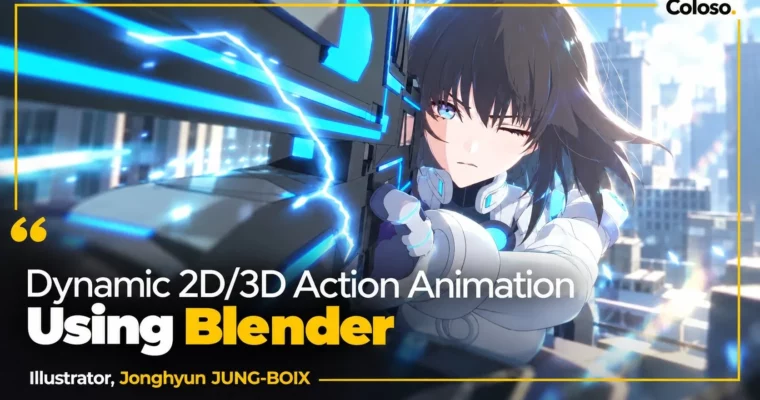
Dynamic 2D & 3D Action Animation Using Blender by Jonghyun JUNG-BOIX

Dynamic 2D & 3D Action Animation Using Blender by Jonghyun JUNG-BOIX

/

Author:Jonghyun JUNG-BOIX

Duration:20Hours 25Minutes

Actual Duration:40h 48m

Release date:2025

Publisher:Coloso

Skill level:Advanced

Language:English

Exercise files:Yes

Software:Blender

Course URL:https://coloso.global/en/products/2danimation-jungjonghyun3-us

Create punchy 2D and 3D action scenes with free Blender Grease Pencil, from rough to effects.

Want to make hard-hitting anime-style action without paying for software? This class shows you how to pull it off with just Blender and Grease Pencil, mixing 2D drawing with 3D cameras, lights, and characters across seven finished scenes.

🎯 What you’ll learn

  • Use Grease Pencil in Draw Mode, Fixed Stroke, Animated Stroke, and Surface Mode
  • Set up backgrounds, sky maps, lights, fog, and shaders for animation
  • Storyboard and direct action scenes with camera layout and rhythm
  • Animate 2D full workflow from rough LO to clean-up, color, and shading
  • Animate 3D characters from blocking to spline to polish with IK/FK switching
  • Create 2D-style stepped animation from 3D with the Breakdowner tool
  • Draw action FX like dust, smears, missiles, lasers, water splashes, and muzzle flashes
  • Finish shots with impact frames, camera shake, motion blur, and glow compositing

βœ… Requirements

  • Skills: Basic understanding of animation principles and timeline workflow
  • Tools: Blender 4.0, 3-button mouse, drawing tablet recommended for Grease Pencil work
  • Hardware: Dedicated GPU and 16GB+ RAM recommended for 3D scenes and playback

πŸ“ Description

This is not a button-tour of Blender. Jonghyun strips it down to what animators actually use: Grease Pencil, timeline, cameras, and a few modifiers. You start with Fixed Stroke vs Animated Stroke, then Surface Mode for painting and animating right on 3D geometry. That means blood splatters, footprints, cracked walls, and water surfaces that stick to the set.

Then you run the full shot process twice. First in pure 2D: storyboard, layout, rough animation, clean-up, fill, shadow and rim light. Then in 3D: rig check, blocking in stepped keys for strong silhouettes, spline pass with the Breakdowner, then polish with overlap, facial, and hair. You also learn when to keep 3D smooth and when to step it to get that snappy anime timing.

The second half is all applied scenes. Multi-character fight with smears and dust. Aerial chase between buildings with missiles and laser effects. Water fight with splashes and contact FX. Gunfight with muzzle flashes, railgun glow, and impact frames. The last chapter ties it together into a true hybrid β€” 3D base for weight and camera, partial 2D redraws for stretch, trails, and punch.

If you have only done 2D or only 3D before, this fills the gap. You get seven example files, free Blender resources, and a repeatable pipeline: concept, rhythm edit with roughs, key poses, inbetweens, FX, and simple compositing with camera shake and motion blur.

πŸ§‘β€πŸŽ“ Who this course is for

  • 3D hobbyists and beginners who want big action results without paid tools
  • 2D animators and art students who want to add 3D cameras and backgrounds to their work
  • Directors and generalists looking for a fast hybrid style for personal films and trailers

πŸ§‘β€πŸ« About the Author

Jonghyun JUNG-BOIX is an animator and director working across features, games, and Japanese TV. After graduating from Gobelins in Paris in 2014, he built credits in VFX, games, and theatrical animation, and now teaches animation at Gobelins.

His recent work includes key animation for One Piece and Dragon Ball DAIMA, trailers for Riot Games including Teamfight Tactics and NewJeans Gods, plus Apex Legends, League of Legends, FINAL FANTASY 7R, KINGDOM HEARTS 3, and Fortiche Arcane. He also directed the short pilot Pick Me Up!. He teaches from that mix of Japanese timing and Hollywood staging, focused on what actually reads on screen.

🏁 Final Result

  • Seven finished hybrid action shots: 2D acrobatic fight, 3D acrobatic fight, multi-character brawl, aerial chase, water battle, gunfight, and a 2D/3D hybrid finale β€” all blocked, cleaned, shaded, and finished with FX and camera polish for your reel.
Curriculum

πŸ“‹ Course content

  1. Section 01: Grease Pencil Basics
      1. Fixed Canvas (Fixed Stroke)
      1. Animated Canvas (Animated Stroke)
  2. Section 02: Background Setup
      1. Sky and Background Placement
      1. Grease Pencil Surface Mode 1: Background Sketch and Painting
      1. Grease Pencil Surface Mode 2: Background Surface FX
  3. Section 03: Full Grease Pencil Workflow: Acrobatic Action 1
      1. Storyboarding and Conceptualizing Scenes
      1. Background Setup
      1. Camera and Layout
      1. Rough Animation
      1. Clean-Up, Color, and Shading (Shadow, Rim Light, Etc.)
      1. Real-Time Effects and Camera Adjustments
  4. Section 04: Blender 3D Character Movement: Acrobatic Action 2
      1. Understanding 3D Character Structure
      1. Utilizing the Advantages and Disadvantages of 3D
      1. Animation 1: Blocking (Rough Stage)
      1. Animation 2: Spline (Smoothing Stage)
      1. Animation 3: Polish (Detailing Stage)
      1. 2D-Style Step Animation
      1. Golden Tips for 3D Animation
      1. Adding 2D Effects
  5. Section 05: Applied Scene 1: 2D Multi-Character Action
      1. Scene Concepting, Background and Camera Setup
      1. Copying Characters with Grease Pencil
      1. Main Character Animation
      1. Adding 2D Effects
  6. Section 06: Applied Scene 2: 2D Aerial/Flying Action
      1. Scene Concepting, Background and Camera Setup
      1. Rough Layouts That Blend Well with the Background
      1. Main Character Animation
      1. 2D FX (Missiles, Lasers, etc.)
  7. Section 07: Applied Scene 3: 3D Water Background Action
      1. Scene Concepting, Background and Camera Setup
      1. Rough Sketch Focused on Rhythm and Timing
      1. Main Character Animation
      1. 2D FX (Water Surfaces, Splashes, etc.)
  8. Section 08: Applied Scene 4: 3D Gunfight Action
      1. Scene Concepting, Background and Camera Setup
      1. Blocking for Establishing Impressive Key Poses
      1. Polishing for Smooth Transitions Between Key Poses
      1. 2D FX (Muzzle Flash, Impact, etc.)
  9. Section 09: Simple 2D and 3D Hybrid Application
      1. Concepting Scenes Based on the Strengths of 2D and 3D
      1. 3D Blocking and Camera Work
      1. Finishing Step Animation Merged with 2D
      1. Enhancing Liveliness with Partial 2D Integration
      1. Effects and Final Touches

πŸ“’ Guys, this is a Group Buy campaign, check the GBC forum thread to get access

You can find the course preview in the download section below.

Watch online or Download for Free
Dynamic 2D & 3D Action Animation Using Blender by Jonghyun JUNG-BOIX
NAME
SIZEDURATION
Jonghyun JUNG-BOIX Eng Dub
18 MB15m
Section 01 – Grease Pencil Basics
11.4 MB10m
Section 02 – Background Setup
6.6 MB5m
Section 03 – Full Grease Pencil Workflow: Acrobatic Action 1
0 B
Section 04 – Blender 3D Character Movement: Acrobatic Action 2
0 B
Section 05 – Applied Scene 1: 2D Multi-Character Action
0 B
Section 06 – Applied Scene 2: 2D Aerial – Flying Actions
0 B
Section 07 – Applied Scene 3: 3D Water Background Action
0 B
Section 08 – Applied Scene 4: 3D Gunfight Action
0 B
Section 09 – Simple 2D and 3D Hybrid Application, Exclusive to Blender’s Grease Pencil
0 B
Jonghyun JUNG-BOIX Eng Sub
62.1 MB25m
Section 01 – Grease Pencil Basics
12.6 MB10m
Section 02 – Background Setup
0 B
Section 03 – Full Grease Pencil Workflow: Acrobatic Action 1
0 B
Section 04 – Blender 3D Character Movement: Acrobatic Action 2
10.5 MB5m
Section 05 – Applied Scene 1: 2D Multi-Character Action
0 B
Section 06 – Applied Scene 2: 2D Aerial – Flying Actions
0 B
Section 07 – Applied Scene 3: 3D Water Background Action
0 B
Section 08 – Applied Scene 4: 3D Gunfight Action
24.9 MB5m
Section 09 – Simple 2D and 3D Hybrid Application, Exclusive to Blender’s Grease Pencil
14.1 MB5m

Download all

Join us on
  Channel    and      Group

Leave a Comment

Your email address will not be published. Required fields are marked *