Blender 3D Hard Surface Modelling

Duration:7 hours on-demand video
Actual Duration:7h 3m
Release date:2025, October
Publisher:Udemy
Skill level:Intermediate
Language:English
Exercise files:Yes
Software:Blender
Course URL:https://www.udemy.com/course/blender-3d-hard-surface-modelling
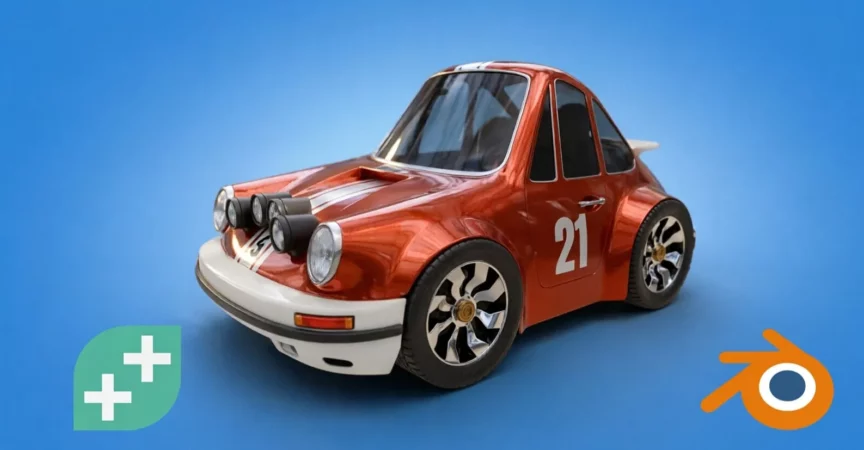
Ready to seriously level up your 3D art game? This course is your ticket to mastering Blender’s hard surface tools. You’ll build a cool, stylized car from the ground up, learning techniques that’ll give you the confidence to model absolutely anything you can dream up – think sci-fi props, game environments, and more. We’re talking about learning how to plan your models right, use Blender’s powerful modifier stack like a pro, and create clean, flexible geometry that’s a breeze to work with and looks fantastic. Forget just following along; you’ll learn to think like a seasoned 3D artist with workflows like edge flow, support loops, and non-destructive modeling. By the end, you’ll have a portfolio-ready model and the skills to tackle your next big creative project.
🎯 What you’ll learn
- Build a stylized car from scratch using Blender’s hard surface modelling tools
- Model clean, game-ready geometry using smart topology and edge flow
- Use modifiers and non-destructive workflows to speed up your process
- Add detail with bevels, edge creases, and support loops
- Personalize your model with accessories, colours, and style
- Prepare your model for shading, lighting, and final rendering
- Gain confidence to design your own 3D models independently
- Develop the skills to tackle vehicles, props, environments, and more
✅ Requirements
- Skills: Basic knowledge of Blender’s interface and navigation, some experience modelling simple 3D objects.
- Tools: A computer capable of running Blender.
- Hardware: No specific hardware requirements beyond what’s needed to run Blender smoothly.
📝 Description
Want to get seriously good at 3D art – and have fun doing it? This course is all about levelling up your Blender skills so you can build awesome models and feel confident creating your own stuff from scratch. You’ll build a stylized car, from scratch. All while gaining the tools and techniques to model anything you can imagine – from sci-fi props to whole game worlds.
Learn how to plan your models properly, use Blender’s modifier stack like a boss and create clean, flexible geometry that’s easy to edit and looks amazing. We’ll cover pro workflows like edge flow, support loops, and non-destructive modelling – so you’re not just following along, you’re learning how to think like a 3D artist. By the end, you’ll have a finished model you’re proud of – and the skills to start building your own vehicles, environments, robots… whatever your creative brain comes up with.
What you’ll learn:
* Build a stylized car while learning solid modelling workflows
* Master Blender’s modifier stack for non-destructive modelling
* Create clean edge flow with bevels, creases, and support loops
* Learn how to refine and add detail without making a mess
* Shade, light and render your final model like a pro
* Gain the confidence to model whatever you imagine next
You don’t need to be an expert. If you’ve played around with Blender and know the basics, you’re ready. Already done the Blender Creator course? Even better – this is your next step. Ready to level up your modelling skills? Jump in and get started today.
🧑🎓 Who this course is for:
- Blender users who want to level up their modelling skills
- Beginners ready to go beyond YouTube tutorials
- Students who want to model detailed, stylized 3D assets
- Anyone looking to feel confident and independent as a 3D artist
🧑🏫 About the Author
The GameDev.tv Team is a renowned group dedicated to teaching game development. With over 1.2 million students and 57 courses, they focus on practical, project-based learning using tools like Unity, Unreal, Godot, and Blender. Their mission is to make game development accessible, practical, and fun for everyone.
Grant Abbitt is an experienced instructor with a passion for 3D animation and games design. He’s been teaching for around 15 years and has a popular YouTube channel, Gabbitt Media, with over 450,000 subscribers. Grant has worked on game models for projects like Atlas Empires and has extensive experience in various 3D fields, including motion graphics and 3D printing.
🏁 Final Result
- A completed, stylized 3D car model, ready for shading, lighting, and rendering, showcasing your mastery of Blender’s hard surface modeling techniques.
 Channel