It looks like you're using an adblocker.
Adblockers make us sad. We use ads to keep our content happy and free. If you like what we are doing please consider supporting us by whitelisting our website. You can report badly-behaved ads by clicking/tapping the nearby 'Advertisement' X text.
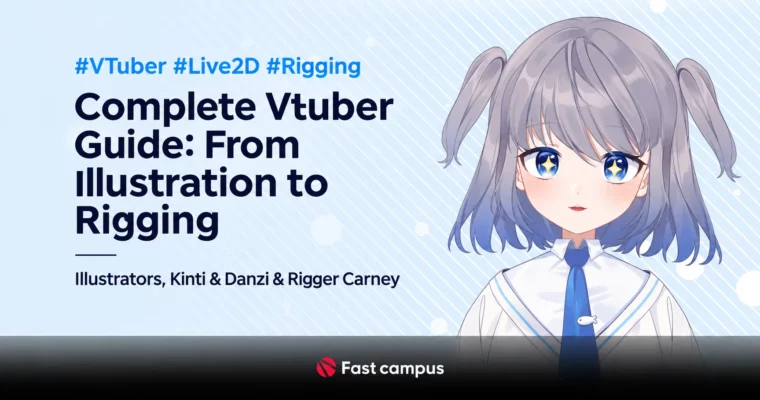
Complete Vtuber Guide – From Illustration to Rigging by Kinti & Danzi & Rigger Carney (Kinti, Danzi, Carney/Kani)
Debut as a VTuber solo, from SD character illustration to Live2D rigging and YouTube streaming.
Debut as a VTuber without expensive outsourcing: draw SD and upper-body characters, rig them in Live2D, and stream on YouTube, guided by illustrators Kinti and Danzi with rigger Carney.
🎯 What you’ll learn
Drawing cute SD characters: tools, shortcuts, sketch, color, and expression parts
Turning illustrations into SD form: body frames, proportions, joints, line art, part separation
Skills: Basic digital drawing orientation is enough; no prior Live2D experience required
Tools: Clip Studio Paint, Photoshop, Live2D Cubism, Vtube Studio, OBS Studio
Hardware: A PC that runs Live2D Cubism and streaming tools comfortably
📝 Description
Studios charge a lot for VTuber outsourcing, and this class teaches the solo alternative end to end: SD characters first, then a full upper-body LD pipeline, then the debut stream. Marketing states 78 clips and about 25 hours; the delivery manifest matches at 78 videos totalling 25:13:01. Full release May 31, 2023 comes from the publisher page. The source pack ships Korean customer subtitles (plain, 78 files); English subtitles in delivery are TTS-matched. No public preview video was found on the publisher page, so the card keeps video_preview null.
🧑🎓 Who this course is for
Aspiring VTubers who want to debut with self-made SD or upper-body models
Illustrators and riggers curious about the full Live2D VTuber pipeline through streaming
🧑🏫 About the Author
Kinti is an illustrator teaching character drawing, Danzi is a YouTuber creator, and Carney (Kani) is a rigger and YouTuber focused on Live2D VTuber production. Together they cover illustration, character setup, rigging, and debut streaming practice.
🏁 Final Result
A moving SD VTuber plus an upper-body Live2D VTuber, both stream-ready via Vtube Studio and OBS on your own YouTube channel.
Curriculum
📋 Course content
Part 1. Intro
Chapter 1. Meet the teachers and the course
CH01_01. Teacher intro: illustrator Kinti
CH01_02. Teacher intro: YouTuber and rigger Carney
CH01_03. Teacher intro: YouTuber Danzi
Part 2. Debut as a VTuber with SD
Chapter 1. Making your own SD character
CH01_01. Which Clip Studio version we use
CH01_02. Basic tools, shortcuts and layers
CH01_03. Useful Clip Studio features
CH01_04. Drawing a simple cute SD character
CH01_05. Drawing through a cute SD frame
Chapter 2. Turning illustration into SD: sketch
CH02_01. Which Photoshop version we use
CH02_02. Only the tools you need for SD characters
CH02_03. Basic shortcuts and layers
CH02_04. Building a body frame for SD characters
CH02_05. SD body proportions
CH02_06. Key SD joints
CH02_07. SD character sketch
CH02_08. Tips for clean, fast, pretty line extraction
CH02_09. Extracting sketch lines
CH02_10. Pre-splitting line art for part separation
Chapter 3. Turning illustration into SD: color
CH03_01. Tools for color planning
CH03_02. Color methods plus layer cleanup and naming
CH03_03. Coloring order
CH03_04. Coloring skin and clothes
CH03_05. Coloring accessories
CH03_06. Coloring hair
CH03_07. Coloring eyes
CH03_08. Coloring finish
Chapter 4. Learning layer part separation
CH04_01. Layer cleanup for rigging
CH04_02. Separating hair parts
CH04_03. Separating face parts
CH04_04. Separating facial feature parts
CH04_05. Separating clothes and accessory parts
CH04_06. Extra parts for natural poses
CH04_07. Extra parts for expressions
Chapter 5. Easy Live2D primer
CH05_01. Downloading and installing Live2D
CH05_02. Full pipeline at a glance, illustration to Live2D
CH05_03. Live2D glossary
CH05_04. Basic tools and favorite shortcuts
CH05_05. Adding points to make meshes
CH05_06. Warp deformers and rotation deformers
CH05_07. Assigning motion to parameters and moving them
CH05_08. Physics and texture atlas
Chapter 6. Making a Live2D VTuber with SD
CH06_01. Character meshing
CH06_02. Draw order and deformer cleanup
CH06_03. Moving eyes, brows and pupils
CH06_04. Moving hair
CH06_05. Making mouth shapes
CH06_06. Giving the face angles
CH06_07. Simple body motion
CH06_08. Adding expressions and raising detail
Chapter 7. Finishing a moving SD VTuber
CH07_01. Character setup in physics
CH07_02. Texture atlas, export and shortcut setup
CH07_03. Loading in Vtube Studio and moving the character
CH07_04. Using Vtube Studio on a budget
Part 3. Debut with an upper-body LD VTuber
Chapter 1. Hands-on Live2D VTuber: character design
CH01_01. Clip Studio intro
CH01_02. VTuber design, feedback and retouch
CH01_03. Character line art
CH01_04. Character coloring
CH01_05. Character part separation
CH01_06. Inner-mouth parts
CH01_07. Extra parts for personality
Chapter 2. Hands-on Live2D VTuber: rigging and animation
CH02_01. Character meshing
CH02_02. Draw order and deformer cleanup
CH02_03. Moving eyes, brows and pupils
CH02_04. Moving hair
CH02_05. Moving the mouth
CH02_06. Giving the face angles
CH02_07. Attaching hair to face angles
CH02_08. Hair up-down motion and head tilts
CH02_09. Simple body motion
CH02_10. Adding expressions and raising detail
Chapter 3. Hands-on Live2D VTuber: finishing
CH03_01. Character setup in physics
CH03_02. Texture atlas, export and shortcut setup
CH03_03. Using Vtube Studio on a budget
Part 4. Debut D-day: streaming
Chapter 1. Hands-on: YouTubing as a Live2D VTuber
CH01_01. Opening a YouTube channel
CH01_02. Installing OBS Studio and linking the channel
CH01_03. Showing the VTube Studio character on screen
CH01_04. Stream, mic and scene checks, then going live



 Channel