Ad Clicks : Ad Views : Ad Clicks : Ad Views : Ad Clicks : Ad Views : Ad Clicks : Ad Views :
Oh Snap!

It looks like you're using an adblocker. Adblockers make us sad. We use ads to keep our content happy and free. If you like what we are doing please consider supporting us by whitelisting our website. You can report badly-behaved ads by clicking/tapping the nearby 'Advertisement' X text.

TWINMOTION Real-time 3d architecture visualization by Abdelaziz Magdy, Misho Sakr, Mohammad EL Ashram

TWINMOTION Real-time 3d architecture visualization by Abdelaziz Magdy, Misho Sakr, Mohammad EL Ashram

/

Author:Abdelaziz Magdy, Misho Sakr, Mohammad EL Ashram

Duration:5h 47m

Release date:2022, March

Publisher:Udemy

Skill level:Beginner

Language:English

Exercise files:Yes

Software:Twinmotion

Course URL:https://www.udemy.com/course/twinmotion

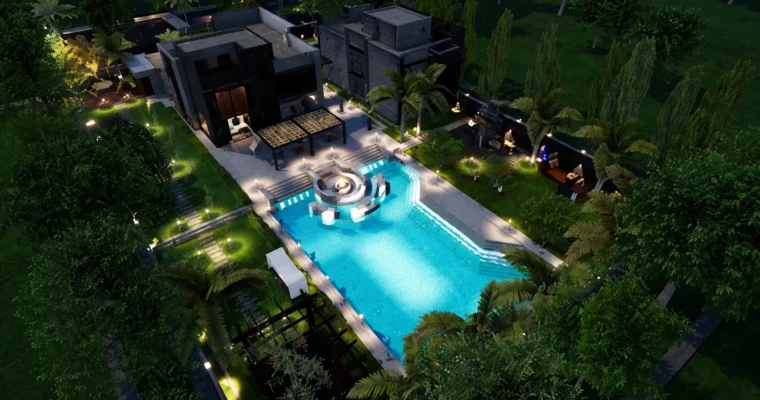
Learn to create stunning 3D images, fly-through animations, and VR walkthroughs for architectural projects using Twinmotion's real-time engine.

This course is a straight-up, no-nonsense guide to getting fast, high-quality architectural visualizations out the door using Twinmotion. Forget clunky render times—this is about real-time feedback and quick iteration. You’ll go from a basic 3D model to a polished presentation with still images, fly-through videos, and even a VR walkthrough, all without the headache.

🎯 What you’ll learn

  • Create quick 3D presentations of architectural projects.
  • Build fly-through animation videos with ease.
  • Produce interior design 3D shots efficiently.
  • Set up interactive, game-like presentations for your projects.

✅ Requirements

  • Skills: Basic knowledge of 3D modeling in any software.
  • Hardware: A computer capable of running Twinmotion (dedicated GPU recommended).

📝 Description

This course is built around a single, practical case study: a simple villa. You’ll follow a step-by-step process from importing your FBX file all the way to the final render. The instructors focus on the fastest path to a great result, skipping the fluff and getting straight to the tools that matter.

You’ll start by setting up your project and getting familiar with the Twinmotion interface. From there, it’s a straight shot into materials, lighting, and populating your scene with assets from the library. The course covers the full range of output options, including still images, panoramas, animation videos, and BIMmotion VR presentations. It’s also been updated to include newer features like the vegetation scatter tool, volumetric lights, and the physical sky system, keeping the content relevant for current versions of the software.

🧑‍🎓 Who this course is for

  • Architects looking for a fast presentation tool.
  • Visualization artists wanting to speed up their workflow.
  • Architecture students needing to create quick renders.
  • Interior designers exploring real-time rendering.
  • CG artists interested in real-time visualization.

🧑‍🏫 About the Author

This course is taught by a team of three experienced instructors from Egypt. Mohammad EL Ashram is an Autodesk Certified Professional with over 12 years of experience in 3ds Max and a background in architecture. Misho Sakr is an architect and interior designer with a decade of experience in architectural visualization. Abdelaziz Magdy is a visualization professional who has worked on a wide range of projects, from residential to commercial, and is passionate about teaching the next generation of artists.

🏁 Final Result

  • A complete, portfolio-ready architectural visualization of a villa, including rendered still images, a fly-through animation, and a VR walkthrough.
Curriculum

📋 Course content

  1. Module 1: Getting Started
    • Course overview3:19
    • Case study villa animation in Twinmotion3:45
    • HOW TO DOWNLOAD TWINMOTION FOR FREE!!!3:52
    • INTERFACE8:23
    • NAVIGATION6:11
    • GENERAL IDEA ABOUT TWINMOTION CAPABILITIES5:29
  2. Module 2: Workflow & Importing
    • IMPORTING FBX. & MANAGE OUR WORKFLOW6:42
    • PREPARING THE 3D FILE7:35
    • IMPROVING WORKFLOW USING HANDY TIPS AND TRICKS11:05
  3. Module 3: Materials & Environment
    • MATERIALS12:26
    • APPLYING MATERIALS TO OUR SCENE12:33
    • Video as material and improvements in glow3:04
    • Grunge option in material1:16
    • X-ray material2:38
    • LANDSCAPE12:35
    • VEGETATION8:27
    • Vegetation scatter, HQ trees and Growth7:14
    • Grass customization, HQ assets and vegetation paint improvements9:36
    • TIME-LAPS FOR VEGETATION8:43
  4. Module 4: Objects & Lighting
    • FURNITURE AND THEIR OBJECTS FROM THE LIBRARY9:35
    • IMPORT EXTERNAL 3D OBJECTS TO TWINMOTION4:50
    • GET QUALITY 3D OBJECTS FROM THE INTERNET4:44
    • ADD TO USER LIBRARY3:55
    • GET MORE 3D OBJECTS USING BIM-OBJECTS6:37
    • LIGHTS10:52
    • New area light3:01
    • Volumetric light4:19
    • ADDING ANIMATED CHARECTERS TO YOUR SCENE6:57
    • VEHICLES3:49
    • New construction vehicle1:39
    • New smart aircrafts2:40
    • VOLUMES6:37
    • Note tool3:19
    • Animator16:22
  5. Module 5: Urban & Nature
    • URBAN: CONTEXT4:17
    • URBAN PATHS12:16
    • URBAN CAMERA ALIGN2:04
    • URBAN :MEASURE2:51
    • NATURE :LOCATION2:33
    • New physical sky8:03
    • Nature Weather4:01
    • NATURE LIGHTING7:09
    • NATURE OCEAN2:34
  6. Module 6: Media & Export
    • MEDIA & CREATE ‘IMAGE’13:02
    • Depth of field Improvements1:46
    • MEDIA & EXPORT “IMAGE”7:11
    • MEDIA & EXPORT PANORAMA5:54
    • MEDIA:CREATE ANIMATION VIDEOS11:37
    • MEDIA :Create BIMmotion virtual reality15:03
    • Phase8:34
    • Twinmotion presenter10:54
    • TWINMOTION FINAL RENDER FILE0:02
  7. Module 7: Updates & Bonus
    • Twinmotion2020.2 new features teaser1:32
    • BONUS LECTURE1:28
Watch online or Download for Free
TWINMOTION Real-time 3d architecture visualization by Abdelaziz Magdy, Misho Sakr, Mohammad EL Ashram
NAME
SIZEDURATION
1. Introduction
125.6 MB
3. MATERIALS
409.2 MB
4. LANDSCAPE & VEGETATION
525.9 MB
6. Urban Category
375.8 MB
7. Nature Category
294.6 MB

Download all Videos (36)
4.2 GB


Download all

Join us on
  Channel    and      Group

Leave a Comment

Your email address will not be published. Required fields are marked *