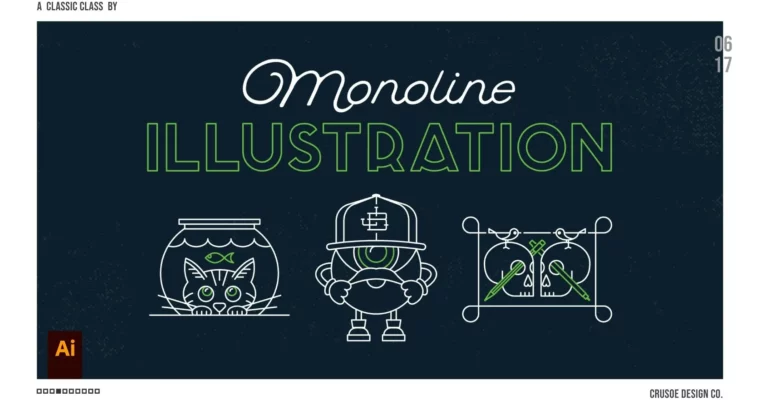
Monoline Illustration in Adobe Illustrator – From Sketch to Vector by Jon Brommet

Duration:1h 9m
Actual Duration:1h 9m
Release date:2020
Publisher:Skillshare
Skill level:Intermediate
Language:English
Exercise files:Yes
Software:Adobe Illustrator
Course URL:https://www.skillshare.com/en/classes/monoline-illustration-in-adobe-illustrator-from-sketch-to-vector
This class walks you through a complete monoline illustration workflow in Adobe Illustrator. You’ll start with reference gathering and sketching, then move into vectorizing your artwork with clean, consistent lines. The focus stays on a simple, repeatable process that works for logos, icons, branding, and editorial projects.
🎯 What you’ll learn
- Choose and refine a subject for monoline illustration
- Gather reference images and turn them into usable inspiration
- Sketch out ideas on paper or digitally
- Use key Illustrator tools to vectorize your artwork with clean, consistent lines
- Apply your finished illustration to different design contexts like logos, merch, and icons
✅ Requirements
- Skills: Basic familiarity with Adobe Illustrator’s interface and tools
- Tools: Pen and paper or a drawing tablet for sketching
- Hardware: Computer capable of running Adobe Illustrator
📝 Description
Monoline illustration is everywhere right now—logos, icons, merch, editorial. The style is simple: one consistent line weight, no shading, no fills. But getting that clean, confident line from a rough sketch into vector form takes a solid workflow. That’s exactly what this class covers.
Jon breaks down his entire process, starting with how he finds reference imagery and pulls inspiration without copying. You’ll learn how to break a subject down into basic shapes before you even pick up a pen, which makes sketching way less intimidating. Then he moves into Illustrator and shows you the exact tools and techniques he uses to trace and refine your sketches into crisp, scalable vector lines.
The class includes three full sketching demos—a cat, a monster, and a skull—plus two time-lapse vectorizing sessions so you can see the whole pipeline in action. It’s practical, straight to the point, and built around a repeatable process you can apply to any subject.
🧑🎓 Who this course is for
- Intermediate Adobe Illustrator users looking to explore a minimal, modern illustration style
- Logo designers and digital artists who want to add monoline work to their repertoire
- Beginners with some Illustrator familiarity who want a clear, structured workflow to follow
🧑🏫 About the Author
Jon Brommet runs Crusoe Design Co., a design studio focused on illustration and branding. He’s an active creator on Instagram and YouTube, where he shares his process and builds a community around his work. His teaching style is straightforward and practical, grounded in real client work and personal projects rather than abstract theory.
🏁 Final Result
* A polished monoline vector illustration of your chosen subject—cat, monster, or skull—complete with initial sketches and a refined final art piece ready for portfolio use
 Channel